- Under-desk drawers need 8 to 12 inches (20 to 30 cm) of underside depth and 2 inches (5 cm) of thigh clearance.
- Desktop caddies stay within a 14 to 18 inch (36 to 46 cm) reach zone for items grabbed multiple times an hour.
- Measure crossbar position, front lip overhang, and monitor bottom height before picking a mounting style.
- Match closed storage to low-frequency clutter and open slots to tools you reach for without looking.
Where Your Pens, Drives, and Notebooks Actually Go
A laptop, an external monitor, and a full-size keyboard leave very little open flat space on a 48 by 24 inch (122 by 61 cm) work surface. Loose sticky notes, charging cables, flash drives, and pens quickly drift toward the edges of the keyboard or pile up under the monitor stand. Choosing a desk organizer comes down to a structural trade-off between mounting a sliding drawer underneath the tabletop and placing an open-top caddy directly on the work surface.
An under-surface tray clears the visual field and leaves room for a wider mouse pad or reference documents. That hidden tray hangs down into the space where your legs move and requires a clear wooden or composite underside for mounting. A surface-level rack needs zero installation and puts every pen or notepad half a second from your hand. In exchange, it claims 40 to 100 square inches (258 to 645 sq cm) of surface area and keeps multicolored items in your peripheral vision. Measuring underside framing, vertical leg clearance, reach frequency, and visual load shows which configuration fits your desk and habits.
How Under-Surface Clearance Compares to Open-Top Reachability
Deciding whether supplies belong above or below the tabletop starts with measuring your furniture boundaries and tracking how often you touch the items you store. Under-desk drawers fail most often because of hidden structural obstacles beneath the desk. Desktop caddies fail when they crowd your mouse hand or sit too far away to reach comfortably from a seated position.
Under-tabletop measurements come first because most clamp-on or screw-mounted pull-out drawers drop 2 to 4 inches (5 to 10 cm) below the bottom face of the desk. On a standard fixed-height desk standing 29 to 30 inches (74 to 76 cm) tall, a 3.5 inch (9 cm) drawer assembly reduces the floor-to-drawer opening to roughly 25.5 inches (65 cm). Keeping at least 2 inches (5 cm) of open space between the tops of your thighs and the lowest slide hardware prevents you from bumping your legs when you swivel or cross your ankles. Mounting also requires an unobstructed flat depth of 8 to 12 inches (20 to 30 cm) and a width of 14 to 24 inches (36 to 61 cm) behind the front edge. Many standing desks and metal-framed tables run a 1.5 to 2 inch (4 to 5 cm) steel crossbar or motorized drive rod 6 to 10 inches (15 to 25 cm) back from the front lip. That beam blocks full-depth slide tracks unless you add spacer brackets. C-clamps avoid wood screws, though they require 1.5 to 2.5 inches (4 to 6 cm) of flat overhang and a tabletop thickness between 0.5 and 2 inches (1.3 and 5 cm) without a beveled skirt.

Measure unobstructed underside depth and vertical knee clearance before mounting a drawer.
Run your hand along the underside of your desk before measuring width. Recessed cable trays, steel support aprons, and beveled front edges often reduce usable mounting depth by 3 to 5 inches (8 to 13 cm).
One option that fits this checklist is VIVO Black Under Desk 22 inch Wide Pull-Out Drawer (DESK-DR22B), so compare its exact mounting dimensions and clearance specifications against your frame measurements.
VIVO Black Under Desk 22 inch Wide Pull-Out Drawer (DESK-DR22B)
A desk organizer worth comparing against the criteria in this guide.

See the current price on Amazon.
View on AmazonOn top of the desk, ergonomic workspace guidelines divide the surface into two reach zones. The primary reach zone sits 14 to 18 inches (36 to 46 cm) from your torso, matching the sweep of your forearms with your elbows resting near your sides. A secondary reach zone extends from 18 to 24 inches (46 to 61 cm) and requires reaching from the shoulder. Placing an open-top desk organizer inside the 14 to 18 inch (36 to 46 cm) arc lets you grab a highlighter, stylus, or ruler in a single motion without shifting your chair backward. Reaching into an under-desk drawer takes three separate actions instead: you lean or roll back 4 to 6 inches (10 to 15 cm) so the front lip clears your lap, pull the tray out 6 to 10 inches (15 to 25 cm) on its glides, and push it shut again.
Single-motion reach on the desktop comes with visual clutter and vertical bulk. A tiered desktop caddy typically spans 6 to 12 inches (15 to 30 cm) in width, 4 to 9 inches (10 to 23 cm) in depth, and 5 to 12 inches (13 to 30 cm) in height. Monitor screens sitting 4 to 6 inches (10 to 15 cm) off the desk leave too little headroom for a tall vertical organizer filled with 6 inch (15 cm) pens or scissors, forcing the caddy out to the left or right side. Open compartments also keep every label, paper clip, and cord visible at all times while collecting airborne dust that needs wiping out every 2 to 4 weeks.

Keep high-frequency tools inside the primary reach arc and store backup supplies further out.
Typical Range Comparison: Under-Desk Drawers vs. Desktop Organizers
The table below outlines how hidden pull-out trays and open surface organizers compare across spatial and practical measurements. All numbers shown in the table are examples of typical ranges found across standard home and office setups.
| Criterion | Under-Desk Pull-Out Drawer (Example Ranges) | Open Desktop Organizer (Example Ranges) | What to Measure at Your Desk |
|---|---|---|---|
| Desktop Footprint Used | 0 sq in (0 sq cm) on the top surface; C-clamps may cover 1 to 2 in (2.5 to 5 cm) of the front edge | 24 to 108 sq in (155 to 697 sq cm), typically 6 to 12 in (15 to 30 cm) wide by 4 to 9 in (10 to 23 cm) deep | Open area next to your keyboard and mouse pad |
| Under-Surface Clearance Needed | 2 to 4 in (5 to 10 cm) vertical drop; 8 to 12 in (20 to 30 cm) clear depth behind front lip | 0 in (0 cm) underneath; requires 5 to 12 in (13 to 30 cm) of vertical headroom on top | Seated thigh-to-desk gap and front crossbar depth |
| Optimal Reach & Access Speed | Two-step pull and push; suits items used 1 to 5 times per day | Single-motion reach within a 14 to 18 in (36 to 46 cm) arc; suits items used 5 to 20 times per hour | Distance from your seated elbow to the planned spot |
| Interior Vertical Capacity | Shallow compartments, usually 1.25 to 3 in (3.2 to 7.6 cm) tall; stores items flat | Tiered slots and cups holding items 4 to 8 in (10 to 20 cm) tall upright | Height of your tallest bottles, notebooks, or tools |
| Visual Clutter & Dust Exposure | Fully enclosed when pushed shut; hides multicolored gear and blocks dust | Fully visible in peripheral sight; open slots need dusting every 2 to 4 weeks | Whether visible items distract you during screen work |
Rows two and four act as hard physical filters before you weigh aesthetics. Knees sitting within 2.5 inches (6.4 cm) of the underside of the desk when your chair is set for typing will rub against even a slim under-desk tray unless you mount it to the far left or right side of the knee well. Storing upright bottles of ink, tall pairs of shears, or thick vertical pads also rules out a 2 inch (5 cm) tall sliding drawer, which forces items to lie flat and quickly fills horizontal tray space.
Mock up the footprint before deciding by taping a standard 8.5 by 11 inch (22 by 28 cm) sheet of paper to the desktop to test surface crowding, or taping a 3 inch (8 cm) deep cardboard box under the front edge to check knee clearance over a full workday.
How the Right Choice Shifts by Workspace Setup
A compact apartment desk measuring 36 to 42 inches (91 to 107 cm) wide and 20 inches (51 cm) deep leaves just enough surface space for your wrists, keyboard, and mouse movement. Placing an 8 by 6 inch (20 by 15 cm) caddy on top often pushes the mouse pad toward the edge or crowds your coffee mug against the laptop keyboard. An under-desk drawer preserves the entire top surface for active work, provided the desk is at least 0.75 inches (1.9 cm) thick to hold short mounting screws or sturdy C-clamps without flexing. You can check these tight-footprint criteria against Lipper International 4-tier Mini Desk Organizer by seeing how its tier measurements and footprint details match your open surface area.
Lipper International 4-tier Mini Desk Organizer
One more desk organizer to check against the same criteria.

See the current price on Amazon.
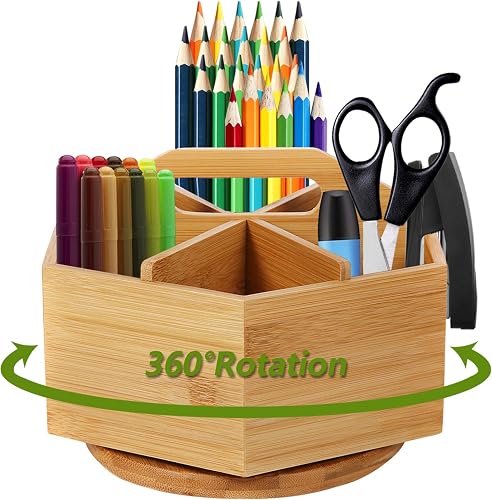
View on AmazonGraphic designers, crafters, architects, and students who switch between fineliners, markers, rulers, and erasers every few minutes quickly tire of opening and closing a lower drawer. Even a smooth ball-bearing slide adds friction when your eyes stay locked on a sketchpad or tablet screen and you swap tools by feel. A multi-compartment desktop organizer placed 15 inches (38 cm) from your dominant shoulder keeps upright tips sorted by angle and height so you can grab and return pens without looking away. For that kind of reach, compare the compartment layout and overall dimensions of Marbrasse Bamboo Art Supply Organizer against your daily supplies.
Marbrasse Bamboo Art Supply Organizer
Another desk organizer option to weigh against the points above.
See the current price on Amazon.
View on AmazonShared workstations and dual-purpose dining or living room tables bring different priorities. Twenty pens, three charging bricks, and stacks of sticky notes sitting in an open rack make a main living area or video call background look busy even when every item is neatly sorted into slots. A low-profile under-desk drawer lets you sweep adapters, dongles, and pens out of sight in five seconds at the end of the day. Many people working at larger 60 by 30 inch (152 by 76 cm) desks combine both approaches by placing a compact 4 by 4 inch (10 by 10 cm) cup or mini tray on top for two constantly used pens and a notepad while mounting an off-center under-desk drawer for calculators, spare cables, staples, and flash drives used once or twice a day.
Check the thickness of the solid outer frame before mounting a screw-in drawer underneath a particleboard or hollow-core desktop. Hollow cores often have only 0.25 inches (0.6 cm) of surface skin in the center and cannot hold threaded screws securely.
Common Questions
Can I install an under-desk drawer on a standing desk with a central crossbar?
Yes, provided you measure the distance from the front lip of the desk to the front face of the steel crossbar first. Most dual-motor standing frames locate the central support beam 8 to 11 inches (20 to 28 cm) back from the front edge. A shallow pull-out drawer needing 8 inches (20 cm) or less of mounting depth sits entirely in front of the beam. Deeper 10 to 12 inch (25 to 30 cm) trays require drop-down mounting brackets of 1.5 to 2 inches (4 to 5 cm) that let the drawer body slide underneath the metal rail.
How much weight can a clamp-on drawer or desktop organizer safely hold?
Weight capacity depends on the mounting method and tabletop material rather than tray size alone. Typical adhesive-mounted plastic under-desk trays hold lightweight items totaling 2 to 5 pounds (0.9 to 2.3 kg), such as pens, sticky notes, and earbuds. Screw-in or steel C-clamp drawers commonly support 10 to 15 pounds (4.5 to 6.8 kg) when attached to solid wood or thick MDF at least 0.75 inches (1.9 cm) thick. Desktop organizers rest directly on the table surface with little structural weight risk, though placing 2 to 3 pounds (0.9 to 1.4 kg) of heavier items like staplers or tape dispensers in the bottom tier helps prevent a tall caddy from tipping when you pull a pen from the top slot.
Where should a desktop organizer sit to avoid shoulder and wrist strain?
Place an open desktop organizer on your dominant-hand side inside your primary or close secondary reach zone, roughly 14 to 20 inches (36 to 51 cm) from the front of your torso. Keeping frequently grabbed tools within this arc can help reduce strain from repeated torso twisting or overextending your shoulder across a wide keyboard tray. Avoid placing a tall organizer directly between your keyboard and monitor, where reaching over the keys forces you to lift your elbows high off the armrests.
Research-based. Based on manufacturer specifications and public information. Product details can change after the last-updated date. Prices are not shown here; check the retailer for the current price.