- Measure your elbow height sitting and standing; the desk must reach both, with the keyboard on top.
- Frame and stability matter more than the number of memory presets, especially with two monitors.
- Check the desktop size, the weight you plan to put on it and what is included before you compare listings.
Work out your two heights first
A standing desk has to work twice: low enough for typing while you sit, and high enough for typing while you stand. The way to find both is simple. Sit upright with your shoulders relaxed and your elbows bent near a right angle, then measure from the floor to your forearm. Do the same standing up. Subtract the thickness of your keyboard and the two numbers are the desktop heights you need.
Most people get a few inches of surprise from this. A desk that starts at a typical seated height can still be too high for a shorter reader, and a desk that tops out near typical standing height can leave a taller reader leaning over the keyboard. The range on a listing is the first number to compare with your own, and the lowest and highest values both count.

Set the desk so your forearms are about level with the keyboard in both positions (example layout).
Standing desk frames, motors and what stability depends on
Stability is where a standing desk earns or loses its money. The two things that decide it are the frame and how tall the desk is raised. Every desk wobbles a little at full height. A frame with a wide base, thick legs and cross-bracing wobbles less than a narrow one, and a desk that is only raised partway wobbles less than one at its limit.
Motor count is the spec people argue about most. A single motor can be enough for a light setup, while two motors split the lifting and usually run more evenly under a heavier load. The honest way to decide is by what will sit on the desk, not by the motor count alone. Add up the monitors, the computer and anything else heavy, and compare that with the weight capacity on the listing, leaving some room to spare.
The weight rating is a limit, not a target, so choose a desk rated comfortably above what will sit on it.
Leg stages matter too. Two-stage legs are common and simpler. Three-stage legs fold down smaller and reach a wider range, which helps if your sitting and standing heights are far apart, at the cost of more joints that can add a little sway.
Desktop size, edges and what is included
Desktop size is a decision about your space as much as your gear. A desk that is deep enough lets you sit with a monitor at a comfortable distance, and one that is wide enough keeps the mouse hand from running into a wall. Measure your room first, then check the footprint on the listing against it. Remember that the frame sets the minimum and maximum width the desktop can have if you plan to swap the top later.
Check what the price covers. Some listings sell a frame only, some include a desktop, and some include a controller with memory presets while others do not. The listing should also say whether a cable tray, an anti-collision feature or a power strip is included, because those are the things that get bought separately later.
| Choice | Good for | Watch out for |
|---|---|---|
| Single motor frame | One monitor and a laptop | Slower lifting and more wobble under a heavy load |
| Dual motor frame | Two monitors or a desktop computer | Heavier to assemble |
| Two-stage legs | Simple frames, narrow sitting-to-standing range | Range may not reach your tallest or lowest setting |
| Three-stage legs | Wide height range | A little more sway at full height |
| Frame only | Using a desktop you already own | Needs a top that fits the frame |
The table describes the choices in general terms, not any specific product.
Before you order: a short checklist
- Write down your sitting and standing heights, minus the keyboard.
- Confirm that the height range on the listing covers both numbers.
- Add up the weight of everything that will go on the desk and compare it with the capacity.
- Check the desktop size against your room and your monitors.
- Read what is included: desktop, controller, memory presets, cable tray.
- Look at the return policy, since a desk is large and awkward to send back.
Candidates to compare
Here are three electric height-adjustable desks listed at the same desktop size, so they make a fair set to check against the checklist. One candidate is the FEZIBO electric height adjustable standing desk. Check the height range and the weight capacity on the product page.
FEZIBO electric height adjustable standing desk, 48 x 24 inch
An electric height-adjustable desk to compare against the height, frame and stability checks in this guide.
- Style
- Electric height-adjustable desk
- Desktop
- 48 x 24 inch (per listing title)
Worth checkingCheck the height range and the weight capacity on the listing.

See the current price on Amazon.
View on AmazonA second candidate is the CubiCubi electric height adjustable standing desk. The listing should tell you what is included, so confirm that before you decide.
CubiCubi electric height adjustable standing desk, 48 x 24 inch
A second electric height-adjustable desk to check against the same checklist.
- Style
- Electric height-adjustable desk
- Desktop
- 48 x 24 inch (per listing title)
Worth checkingConfirm what is included, such as the desktop and the control panel.

See the current price on Amazon.
View on AmazonThe ErGear height adjustable electric standing desk is a third candidate. Look at the assembly details and the warranty terms on its page.
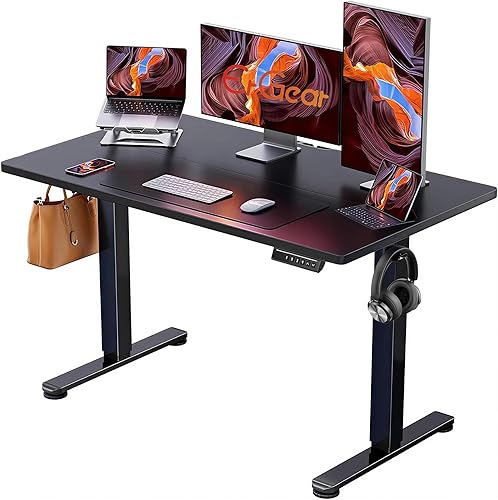
ErGear height adjustable electric standing desk, 48 x 24 inch
A third electric height-adjustable desk to compare on frame, motor setup and desktop size.
- Style
- Electric height-adjustable desk
- Desktop
- 48 x 24 inch (per listing title)
Worth checkingCheck the listing for assembly details and the warranty terms.
See the current price on Amazon.
View on AmazonCommon questions
Is a bigger desktop always better?
No. A larger desktop is steadier to work on and holds more, but it needs more floor space, and a larger top puts more weight on the frame. Pick the size that fits your room and your monitor setup.
Do memory presets matter?
They save a few seconds each time you switch, which adds up if you change position often. They do not make the desk more stable, so they come after the frame and the height range on your list.
How should I use a standing desk?
Many people alternate positions through the day, rather than standing for hours at a time. Pick a pattern that feels comfortable for you, and pay attention to how your body responds as you try different heights.
Research-based. Based on manufacturer specifications and public information. Product details can change after the last-checked date. Prices are not shown here; check the retailer for the current price.