- Bases over 6 to 8 inches (15 to 20 cm) wide often crowd keyboards on 24-inch (61 cm) deep desks.
- Aim for 500 to 1,000 lux at the work surface and a 4,000K to 5,000K color temperature for reading and writing.
- Clamps save surface space but usually fail on tabletops thicker than 2 inches (5 cm) or desks with back aprons.
- A Color Rendering Index (CRI) of 80 or higher keeps ink and printed colors looking natural under LED light.
Why a 6-Inch Base Can Crowd a Standard 48-by-24-Inch Desk
A weighted base measuring 6 to 8 inches (15 to 20 cm) across looks compact on a shelf, yet it quickly crowds a home office desk that is 48 inches (122 cm) wide and 24 inches (61 cm) deep. Centering a 27-inch (69 cm) monitor on its stand and pulling a keyboard and mouse pad forward leaves a back-corner strip narrower than 6 inches (15 cm). Pushing a circular base into that gap either forces the monitor off-center or nudges the lamp into the path of your wrists and mouse hand.
Pull out a tape measure at the exact spot where the lamp will sit before checking brightness specs or arm styles. Record the clear depth behind your keyboard mat, the height from the desktop to the top of your monitor bezel, and the thickness of the desk edge. Having 4 inches (10 cm) versus 8 inches (20 cm) of open surface determines right away whether a weighted base, an edge clamp, or a monitor-mounted bar will physically fit.
Place a 7-inch (18 cm) cereal bowl on the corner of your desk where you plan to put a lamp. If the rim touches your mouse pad or monitor stand, a standard weighted base will feel cramped there too.

On a 24-inch (61 cm) deep desk, a wide weighted base can push into your keyboard zone.
Core Criteria: Illumination, Color Quality, and Mounting Fit
Once your available surface area is measured, match the light output and hardware dimensions to your daily desk work. Spec sheets list several different optical metrics, and reading the right ones prevents dim work zones and harsh screen glare.
Center Illuminance (Lux) Versus Total Lumens
Total lumens measure the light emitted in all directions, which usually runs from 400 to 1,000 lumens for desk lamps. Illuminance, measured in lux, is more useful because it tracks how much light actually lands on your keyboard or notebook from a typical arm height of 15 to 18 inches (38 to 46 cm). General computer work paired with occasional note-taking stays comfortable at 300 to 500 lux across the desk. Sustained reading of fine print, sketching, or handwriting calls for a center illuminance of 500 to 1,000 lux to keep contrast sharp without washing out the page. Asymmetric optical designs angle the beam downward across a 20-by-12-inch (51-by-30 cm) work zone in front of you without bouncing light off a glossy monitor screen.
Color Temperature (Kelvin) and Color Rendering (CRI)
The Kelvin (K) scale measures color temperature, indicating how warm or cool white light appears. Warm light between 2,700K and 3,000K casts a yellowish glow suited for winding down in the evening or ambient room lighting. Neutral white light from 4,000K to 5,000K mimics midday shade and sharpens contrast between black ink and white paper during daytime reading and focused desk work. Cool light at 6,000K to 6,500K adds a bluish tint that can make glossy magazine pages or coated textbook paper look overly bright. Check the Color Rendering Index (CRI) alongside the Kelvin rating on a scale up to 100. Everyday office work requires a standard CRI of 80 or higher, whereas a CRI of 90 or above keeps color-coded notes, printed graphics, and fabric swatches accurate.
Mounting Styles and Edge Clearance
A lamp's mounting hardware sets both its desktop footprint and its reach. Weighted bases sit flat on the desk, require zero edge clearance, and move anywhere. C-clamps and grommet mounts bolt to the back or side lip to free up surface area, though most standard desk clamps only open to a tabletop thickness of 2 inches (5 cm). Recessed steel support rails, beveled edges, or wooden aprons sitting within 2 inches (5 cm) of the back edge will stop a clamp jaw from seating flat underneath. Monitor light bars clip directly onto external display bezels measuring 0.4 to 1.2 inches (1 to 3 cm) thick, taking up zero desk space while lighting the area right in front of the screen.
- Weighted base clearance: Requires a flat 6-to-8-inch (15 to 20 cm) circle or square on the desktop and enough weight to keep a 15-inch (38 cm) extended arm from tipping.
- C-clamp clearance: Requires a flat, unobstructed top and bottom lip up to 2 inches (5 cm) thick, plus at least 2 inches (5 cm) of clear under-desk depth for the screw pad.
- Arm reach and height: Requires a maximum shade height of 18 to 24 inches (46 to 61 cm) to position the light source above a standard monitor rather than beside it.

Check both tabletop thickness and under-desk support frames before choosing a clamp mount.
One model that fits these measurements is BenQ e-Reading LED Desk Lamp, and its specifications can be compared directly against your desk dimensions.
BenQ e-Reading LED Desk Lamp
A desk lamp worth comparing against the criteria in this guide.

See the current price on Amazon.
View on AmazonWhat You Give Up With Each Design Choice
Every desk lamp style trades one practical benefit for another, so choosing a design comes down to which limitation bothers you least in daily use. A heavy freestanding base slides easily from one side of the desk to the other or moves to a dining table in seconds. In return, it takes up space on a shallow 24-inch (61 cm) desk and offers a shorter arm reach than a clamped architect lamp, since a long arm on a freestanding base needs a bulky counterweight.
Swing-arm clamp lamps save desk space and extend 24 to 30 inches (61 to 76 cm) across wide drafting tables or dual-monitor setups. Moving one to another spot, though, means unscrewing the bracket and rerouting the power cord. Clamps can also leave faint pressure marks on soft pine or thin veneer unless you slip a thin coaster or felt pad inside the jaw. Desks with flush back panels or thick storage drawers under the top lip cannot take a clamp at all.
Slide your hand underneath the back edge of your desk before choosing a clamp lamp. If a metal crossbeam sits within 1.5 inches (3.8 cm) of the edge, a standard C-clamp jaw will likely slip off.
Monitor light bars save even more room by resting on top of your display, casting an angled beam over the keyboard without touching the desktop or reflecting off the glass. That compact mount limits flexibility because the bar stays fixed to the monitor bezel. You cannot swing the light to the far-left corner to read a wide binder, and you cannot raise or lower the lamp head independently of the screen. Standalone laptops and monitors with steeply curved backs also make it hard for standard counterweight clips to sit level.
Built-in convenience features carry their own trade-offs. Integrated dimmer sliders, color temperature presets, and base charging ports keep phone cables tidy, yet those models usually rely on a shorter single-hinge arm that lights a smaller circle.
Lepro LED Desk Lamp with USB Charging Port
One more desk lamp to check against the same criteria.
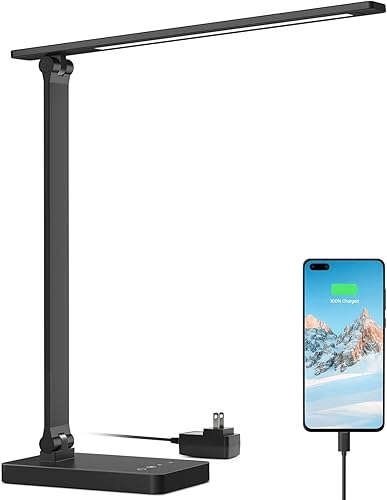
See the current price on Amazon.
View on AmazonComparing Common Desk Lamp Configurations
Comparing the three main form factors side by side shows how their space requirements and lighting coverage differ on a real desk. The numbers in the table below are examples of typical ranges across common desk lamp categories rather than specifications for a single model.
| Feature or Measurement | Standard Weighted-Base Lamp | Articulated Clamp Lamp | Monitor Light Bar |
|---|---|---|---|
| Desktop Footprint Diameter | 6 to 8 inches (15 to 20 cm) | Under 2.5 inches (6.4 cm) at edge | 0 inches (0 cm) on desktop |
| Required Desk Edge Thickness | Any desk thickness | Up to 2 inches (5 cm) flat edge | Fits 0.4-to-1.2-inch (1 to 3 cm) monitor bezel |
| Typical Horizontal Reach | 12 to 16 inches (30 to 41 cm) | 20 to 30 inches (51 to 76 cm) | Fixed directly in front of display |
| Typical Center Illuminance | 400 to 800 lux | 500 to 1,000 lux | 400 to 700 lux |
| Typical Color Temperature Range | 3,000K to 5,000K | 2,700K to 6,000K | 2,700K to 6,500K |
BenQ ScreenBar Monitor Light Bar is a practical candidate to evaluate against the ranges above when matching specifications to your workspace.
BenQ ScreenBar Monitor Light Bar
Another desk lamp option to weigh against the points above.

See the current price on Amazon.
View on AmazonOrder of Decisions and Common Questions
Working through your requirements in a set order keeps you from picking a lamp with strong light specs that cannot physically mount to your desk. Follow these five steps from start to finish:
- Measure your open desktop area and edge profile first to choose between a 6-to-8-inch (15 to 20 cm) freestanding base, an edge clamp needing up to 2 inches (5 cm) of flat lip, or a monitor clip.
- Match your brightness target to your main desk task: 300 to 500 lux for screen-heavy work, or 500 to 1,000 lux at the center of the desk for reading print and writing by hand.
- Pick an adjustable color temperature range that covers 4,000K to 5,000K neutral white for daytime focus, plus warmer 2,700K to 3,000K settings for late evening hours.
- Confirm the arm reach and height range so the lamp head sits 15 to 18 inches (38 to 46 cm) above the desk—staying below your eye line while clearing the top of your monitor.
- Check secondary details last, including a CRI rating of 80 or 90+, flicker-free dimming steps, and power cord length to your nearest wall outlet or surge strip.
Where should I position a desk lamp to avoid shadows while writing?
Place the lamp on the side opposite your writing hand so your arm and pen never block the beam. Right-handed writers can set the lamp base on the front-left or back-left corner and angle the head toward the center of the desk to keep shadows pointing away from the notebook.
Can I use a 6,000K daylight setting all day for reading?
A 6,000K to 6,500K setting works for short tasks, though it often bounces noticeable glare off smooth white paper during long reading sessions. Stepping down to 4,000K to 5,000K keeps text contrast crisp while feeling less harsh against white pages and surrounding desk surfaces.
How high above the desk should the lamp head sit?
Setting the bottom of the lamp head 15 to 18 inches (38 to 46 cm) above the desktop works well for most seated users. From that height, the beam spreads across a 20-inch (51 cm) work zone while keeping the shade below seated eye level, which can help reduce strain from looking straight into exposed LEDs.
What if my desk sits flush against a wall and cannot take a rear clamp?
Desks pushed within 0.5 inches (1.3 cm) of a wall can take a C-clamp on the left or right side edge instead, as long as the arm stretches at least 20 inches (51 cm) to reach the center. A monitor light bar or a compact freestanding base under 6 inches (15 cm) wide will also fit without pulling the desk away from the wall.
Research-based. Based on manufacturer specifications and public information. Product details can change after the last-updated date. Prices are not shown here; check the retailer for the current price.