- Pair closed-back over-ear cups with active noise cancellation to cut low-frequency rumble on trains and planes.
- Aim for a weight around 8.8 ounces (250 g) and deep earpads if you wear a headset for over three hours or use glasses.
- Check for multipoint Bluetooth to switch devices, or a wired or 2.4 GHz dongle connection to avoid audio lag.
Why Does a Headset With Noise Cancellation Still Let Office Chatter Through?
Turning on active noise cancellation (ANC) will not mute every sound in a room, whether that is a coworker on a speakerphone or a barking dog next door. ANC electronics work best on steady, low-frequency drones below roughly 1,000 hertz (Hz), such as the rumble of a subway car, an airplane cabin, or a window air conditioner. Sudden, higher-pitched sounds like human voices and keyboard clatter move too fast for the microphones and opposing sound waves to cancel out completely.
Physical isolation handles those sharper noises through the seal of the earcups against your head. A closed-back, over-ear design uses a solid outer shell and a cushioned ring that wrap completely around the outer ear, acting as a physical barrier before any battery-powered processing starts. On a loud morning train or inside a busy open-plan office, pairing a full over-ear seal with ANC tackles both parts of the problem. The foam and shell muffle nearby voices while the circuitry quiets the low engine hum. To see how these criteria apply to a real model, HyperX Cloud II Gaming Headset is worth examining for its earcup style and isolation specs.
HyperX Cloud II Gaming Headset
A headset worth comparing against the criteria in this guide.

See the current price on Amazon.
View on AmazonActive noise cancellation targets steady low-frequency hums, while a closed-back over-ear seal physically blocks higher-pitched voices and sudden office clatter.
How Do Weight, Clamping Force, and Earpad Depth Affect All-Day Comfort?
A headset that feels fine during a 20-minute call can leave your jaw and temples aching three hours into a shift, which makes total weight the first number to check on a spec sheet. As a general benchmark, a headset weighing around 8.8 ounces (250 g) or less is easier to wear for three hours or more without neck fatigue. Models pushing past 12.3 ounces (350 g) rely on a wide, well-padded headband to spread the load across the crown of your head.
Wearing glasses or having larger ears makes two mechanical details just as critical as weight: how tightly the headband squeezes inward (clamping force) and the internal depth of the earpads. An earpad cavity shallower than about 0.8 inches (20 mm) allows the inner driver wall to press directly against the cartilage of your ear. Stiff faux-leather pads paired with high clamping force will also pinch eyeglass arms against the side of your head and create sore spots within an hour. Memory foam pads wrapped in breathable fabric or soft protein leather give more easily around frames, which can help reduce strain during long afternoon sessions even if a slight gap lets a tiny bit of bass leak out.
SteelSeries Arctis Nova 7 Wireless Multi-Platform Gaming Headset
One more headset to check against the same criteria.

See the current price on Amazon.
View on Amazon
An over-ear cup with at least 0.8 inches (20 mm) of inner depth leaves room for your ear and glasses.
Matching the Connection Type to Your Devices and Latency Needs
Your daily workflow dictates how the headset needs to connect to your hardware. Taking a cellular call on a smartphone and jumping straight into a laptop video meeting calls for Bluetooth multipoint support. Standard Bluetooth pairs with several devices over time, but it connects to only one at a time and forces you into settings menus to switch. Multipoint keeps an active link to two sources at once within a typical wireless range of about 30 feet (9 m), pausing laptop audio automatically when your phone rings.
Logitech Zone Vibe 100 Lightweight Wireless Over-Ear Headphones
Another headset option to weigh against the points above.
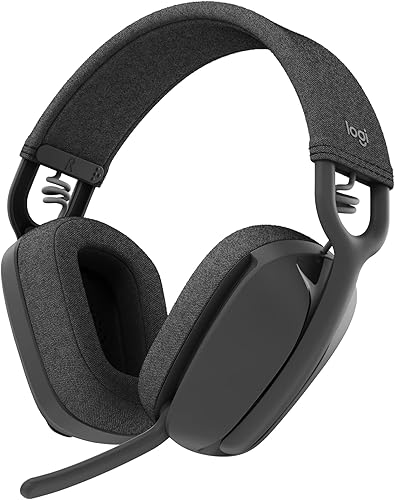
See the current price on Amazon.
View on AmazonTiming-sensitive tasks expose the main limitation of standard Bluetooth. Standard Bluetooth audio codecs introduce a delay (latency) of roughly 150 to 200 milliseconds (ms) between an action on screen and the sound reaching your ears. Streaming apps shift the video track to match, so you will not notice that gap during a podcast. Editing video timelines or playing fast-paced games is different, because a 200 ms lag leaves footsteps, lip movements, and audio cuts noticeably out of sync. Those tasks require a dedicated 2.4 gigahertz (GHz) USB wireless dongle, low-latency codecs that bring delay below 40 ms, or a standard 0.14-inch (3.5 mm) or USB wired cable that drops lag to near zero. To compare plug types and cable details, Logitech H390 Wired Headset provides a useful reference.
Logitech H390 Wired Headset
A headset worth comparing against the criteria in this guide.

See the current price on Amazon.
View on Amazon
Match the connection method to how much audio delay your daily tasks can tolerate.
Standard Bluetooth works well for calls and music, but video editors and gamers should look for a wired cable or a 2.4 GHz USB receiver to keep audio delay under 40 milliseconds (ms).
Typical Headset Specifications by Use Case
Spec sheets rarely explain how raw numbers translate to daily use, so the table below pairs common environments with example ranges for weight, earpad depth, and audio latency.
| Primary Use Case | Recommended Acoustic Design | Typical Weight Range (Example) | Typical Earpad Inner Depth (Example) | Preferred Connection and Latency (Example) |
|---|---|---|---|---|
| Noisy transit and open offices | Closed-back over-ear with ANC | 8.5 to 10.6 ounces (240 to 300 g) | 0.8 to 1.0 inches (20 to 25 mm) | Bluetooth with multipoint; 150 to 200 ms latency |
| All-day desk work (3+ hours, glasses) | Closed-back or semi-open over-ear, low clamp | 6.3 to 8.8 ounces (180 to 250 g) | 0.8 to 1.1 inches (20 to 28 mm) | Multipoint Bluetooth or wired USB; under 200 ms |
| Video editing and competitive gaming | Closed-back or open-back over-ear | 8.8 to 12.3 ounces (250 to 350 g) | 0.9 to 1.2 inches (22 to 30 mm) | Wired 0.14-inch (3.5 mm), USB, or 2.4 GHz dongle; under 40 ms |
When comparing models across these categories, you can review the full specification breakdown of Razer BlackShark V2 X Gaming Headset to see which row it matches.
Razer BlackShark V2 X Gaming Headset
One more headset to check against the same criteria.

See the current price on Amazon.
View on AmazonFour-Step Pre-Purchase Checklist
Running your daily routine through this four-part sequence helps you avoid paying for unused features or missing a detail that leaves the headset in a drawer.
- Audit your loudest environment: Subways, frequent flights, and loud HVAC vents call for a closed-back over-ear shell combined with active noise cancellation, while a quiet spare room requires only a basic passive seal or a lighter on-ear frame.
- Measure your longest wearing stretch: Sessions lasting three hours or more, or all-day eyeglass wear, point toward a weight benchmark around 8.8 ounces (250 g) and memory foam earpads with at least 0.8 inches (20 mm) of inner depth.
- Count your daily devices: Bouncing between a work laptop and a personal phone all afternoon requires explicit Bluetooth multipoint support on the spec sheet rather than simple multi-device memory.
- Match the link to your timing needs: Cutting video or playing games where split-second audio cues matter calls for an included 0.14-inch (3.5 mm) or USB cable, or a dedicated 2.4 GHz wireless adapter, instead of standard Bluetooth alone.
A spec sheet that says "pairs with multiple devices" is not the same as multipoint; look for confirmation that two devices can stay connected simultaneously.
Putting the Criteria Together
Picking a dependable headset means matching its physical build and wireless electronics to the room you sit in and the tools on your desk. Pair a closed-back earcup seal with active noise cancellation for loud rooms, or keep total weight around 8.8 ounces (250 g) with 0.8-inch (20 mm) deep pads if you wear glasses through three-hour shifts. Choose Bluetooth multipoint for two-device switching within 30 feet (9 m), or step up to a wired or 2.4 GHz link to keep audio delay under 40 ms, and then compare the specifications of each candidate to find the right fit for your desk.
Research-based. Based on manufacturer specifications and public information. Product details can change after the last-updated date. Prices are not shown here; check the retailer for the current price.