- Linear switches without internal dampeners still make sharp plastic-on-plastic noise on both strokes.
- Scissor mechanisms shorten key travel to roughly 0.08 inches (2 mm), cutting bottom-out impact force.
- Lubricated stabilizers and internal case foam prevent the hollow rattle of large keys like the spacebar.
- A desk mat at least 0.16 inches (4 mm) thick stops desk surfaces from amplifying low-frequency thuds.
Why Is a Linear Switch Not Automatically a Quiet Keyboard?
Shopping for a quiet keyboard often starts with switch color labels, and many buyers assume a red linear or brown tactile switch guarantees near-silent typing compared with a blue clicky model. That assumption breaks down when a coworker sits 4 feet (1.2 m) away or a partner sleeps in the next room. Removing the internal click jacket or metal leaf eliminates the intentional mid-stroke click, yet two louder sources of mechanical noise remain untouched.
Every keystroke produces two separate physical collisions: the bottom-out impact and the top-out rebound. During bottom-out, the plastic switch stem slams into the bottom housing or the keycap strikes the top plate at the end of a typical 0.16-inch (4 mm) travel distance. On the rebound, the compressed metal spring shoots the stem back up against the top housing as your finger lifts. In a quiet room with a 30 to 35 dBA background noise floor, those rapid plastic-on-plastic snaps peak between 50 and 60 dBA and cut right through thin drywall or open-plan desk dividers.
Two boards can register an identical 45 dBA on a sound meter placed 20 inches (51 cm) away while sounding completely different in pitch. One produces a soft, muted tap, whereas the other creates a sharp, clacky rattle that draws attention across a room. Human hearing is highly sensitive to frequencies between 2,000 and 4,000 Hz, the exact range where thin keycaps and unlubricated wire stabilizers resonate. Evaluating hardware for shared spaces requires checking how the switch absorbs impact, how the outer shell traps resonance, and how the widest keys are supported.
Sound level drops by roughly 6 dBA each time you double the distance from the source in an open room. High-pitched plastic snaps still stand out against a 30 dBA bedroom noise floor.
Switch Mechanism and Internal Dampening: The First Criterion to Check
Before comparing layouts or wireless receivers, check how the key mechanism stops moving at the bottom and top of each press, since designs fall into three main acoustic categories: dampened mechanical switches, low-profile scissor switches, and rubber-dome membrane sheets.
True silent mechanical switches look like standard switches from the outside. Inside, the stem carries tiny thermoplastic elastomer (TPE) or silicone bumpers molded into the top and bottom rails. These rubberized pads absorb kinetic energy on both the downstroke and the upstroke rebound instead of letting hard polyoxymethylene (POM) plastic strike polycarbonate or nylon housing walls. Paired with a moderate actuation force of 1.6 ounces (45 g) to 2.0 ounces (55 g), dampened switches keep typing volume near 35 to 42 dBA while preserving full-travel mechanical feedback. If that profile fits your desk, be quiet! Light Mount Silent Linear Mechanical Gaming Keyboard is one option to compare.
be quiet! Light Mount Silent Linear Mechanical Gaming Keyboard
A keyboard worth comparing against the criteria in this guide.

See the current price on Amazon.
View on AmazonScissor-switch boards use an interlocking X-shaped plastic frame inside each key to guide the keycap straight down over a small rubber dome. Total travel distance is shortened to roughly 0.06 to 0.08 inches (1.5 to 2 mm), so your fingertips never build up the downward velocity that causes loud bottoming out on tall switches. That wide four-point scissor frame also stops the keycap from wobbling and clattering when struck off-center.
Traditional membrane models place a single flexible silicone or rubber sheet beneath full-height plungers that travel about 0.12 to 0.14 inches (3 to 3.5 mm). The soft rubber dome cushions the bottom of the press, but the tall plastic slider sleeves often scrape against the top housing and rattle on the return stroke once factory grease wears thin.

Internal pads soften both the downstroke impact and the upstroke rebound.
How Do Case Acoustics, Keycap Thickness, and Stabilizers Shape the Sound?
Even a quiet switch mechanism sounds loud when mounted inside a hollow plastic shell that acts like an acoustic guitar body. Vibrations from a closing switch travel through the mounting plate into the bottom case cavity, and an empty enclosure reflects those waves back out through the key gaps as a hollow echo or metallic ring.
Internal sound-absorbing layers and dense, low-profile chassis construction keep case resonance under control. In full-height mechanical designs, a 0.06- to 0.12-inch (1.5 to 3 mm) sheet of closed-cell polyethylene or polyurethane foam between the mounting plate and circuit board blocks high-frequency chatter. A silicone or neoprene pad at the bottom of the case eliminates hollow cavities. Keycaps molded from polybutylene terephthalate (PBT) or thick acrylonitrile butadiene styrene (ABS) with 0.05- to 0.06-inch (1.3 to 1.5 mm) walls also produce a lower, duller pitch than thin 0.03-inch (0.8 mm) caps that amplify high-pitched clicks.
Wire-and-housing stabilizers underneath the spacebar, Enter, Shift, and Backspace keys are the most common point where an otherwise quiet board fails in practice. A standard 6.25-unit spacebar measures roughly 4.6 inches (11.7 cm) long and relies on a metal wire to keep both ends level under your thumb. When that wire sits loosely inside dry plastic housings, every press triggers a metallic tick and rattle that exceeds the volume of the letter keys by 5 to 10 dBA. Factory-lubricated stabilizers or tight scissor-style wire clips prevent that rattle during long writing sessions with frequent spacebar presses, and Logitech Signature K650 Wireless Comfort Keyboard illustrates how these layout and construction details come together.
Logitech Signature K650 Wireless Comfort Keyboard
One more keyboard to check against the same criteria.

See the current price on Amazon.
View on AmazonTwo physical setups change how much internal case dampening you actually need:
- Ultra-thin chassis designs: Boards with an overall frame height under 0.6 inches (15 mm) leave almost no internal air cavity beneath the switch plate. With no empty chamber for sound waves to bounce around inside, they rarely need thick internal foam layers to stay quiet.
- Hollow-core desks and glass tops: A well-dampened board can still create a low-frequency boom between 100 and 250 Hz when its rubber feet sit directly on a hollow veneer desktop. Placing a woven cloth and natural rubber desk mat at least 0.16 inches (4 mm) thick under the frame decouples the chassis from the table surface.
Tap both the left and right edges of a spacebar lightly without pressing the key all the way down. Any ticking noise comes from loose stabilizer wires rather than the switch itself.

Foam layers and a thick desk mat stop the housing and desk from acting as a drum.
Comparing Quiet Switch and Chassis Approaches
Different combinations of switch mechanisms and case builds suit different room layouts and typing styles, and the table below lists examples of typical ranges across standard consumer and office models.
| Design Type | Typical Key Travel | Typical Actuation Force | Typical Sound Level at 20 Inches (51 cm) | Primary Acoustic Character |
|---|---|---|---|---|
| Silent Mechanical (Dampened Linear or Tactile) | 0.14 to 0.16 inches (3.5 to 4 mm) | 1.6 to 2.0 ounces (45 to 55 g) | 35 to 42 dBA | Soft, muted thud with cushioned upstroke and downstroke |
| Low-Profile Scissor Switch | 0.06 to 0.08 inches (1.5 to 2 mm) | 1.8 to 2.3 ounces (50 to 65 g) | 35 to 40 dBA | Quick, low-volume tap with minimal key wobble |
| Standard Linear Mechanical (Undampened) | 0.14 to 0.16 inches (3.5 to 4 mm) | 1.6 to 1.8 ounces (45 to 50 g) | 48 to 55 dBA | Distinct plastic clack on both bottom-out and rebound |
| Standard Plunger Over Rubber Dome | 0.12 to 0.14 inches (3 to 3.5 mm) | 1.8 to 2.5 ounces (50 to 70 g) | 40 to 46 dBA | Soft bottom-out paired with light plastic slider chatter on return |
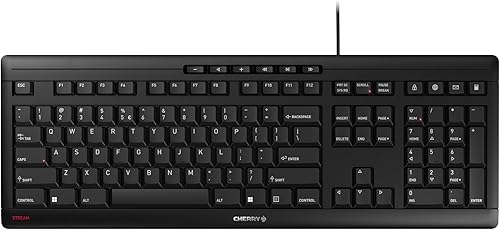
Distance to the nearest person and the time of day determine which range works for your desk. In a busy daytime office where air conditioning and conversation stay around 45 dBA, any design near 40 dBA blends into the background. In a bedroom after midnight with ambient sound near 30 dBA, cutting high-frequency stabilizer rattle and top-out snap matters far more than small differences in actuation force, making Cherry STREAM Keyboard Wired a useful reference against those acoustic thresholds.
Cherry STREAM Keyboard Wired
Another keyboard option to weigh against the points above.
See the current price on Amazon.
View on AmazonPre-Purchase Checklist for Shared Spaces
Four technical checks help match keyboard hardware to your room acoustics and typing habits:
- Verify true two-way dampening: Confirm that the switches use internal elastomer bumpers on the stem rails or a low-travel scissor frame. Do not rely on a "linear" or "tactile" label alone, because undampened stems still snap loudly on the upstroke.
- Check stabilizer construction on wide keys: Look for pre-lubricated plate-mounted stabilizers, tuned wire balances, or scissor-supported modifiers. Proper support keeps the spacebar and Enter key from rattling louder than standard letter keys.
- Match frame height and ergonomics to your desk: A front lip under 0.75 inches (19 mm) or an integrated wrist support with a 5- to 8-degree typing angle can help reduce strain during long sessions. Keeping your fingers at a flatter angle also softens impact force on the keys.
- Plan for desk surface decoupling: Measure your workspace for a 0.16-inch (4 mm) desk mat, such as a 35-by-16-inch (89 by 41 cm) pad, if your table uses thin particleboard, metal, or glass.
Keeping your wrists elevated or resting evenly on a palm support stops your fingers from dropping vertically onto the keycaps like tiny hammers, cutting peak impact noise by several decibels.
Matching the Right Build to Your Room
Quiet typing depends on keeping plastic and metal parts from colliding without a buffer. You might prefer the full 0.16-inch (4 mm) travel of internally cushioned mechanical switches or the compact 0.08-inch (2 mm) stroke of a low-profile scissor mechanism. Checking upstroke dampening, stabilizer tolerances, and desk resonance keeps late-night writing or shared-office work barely audible to the people nearby.
Research-based. Based on manufacturer specifications and public information. Product details can change after the last-updated date. Prices are not shown here; check the retailer for the current price.