- Match shelf depth to your monitor base, which is commonly 8 to 10 inches (20 to 25 cm) deep.
- Check that inside leg clearance exceeds 17.5 inches (44 cm) if you store a full-size keyboard.
- Verify your current screen height first, as risers typically add 2.8 to 4.7 inches (7 to 12 cm).
- Confirm the stand's weight limit supports your display plus any accessories placed on top.
When a New Monitor Stand Creates More Clutter Than It Solves
Adding a riser to a desk is a common way to reclaim workspace and lift a screen. However, many buyers discover after assembly that their monitor base hangs over the edge of the shelf. Others find that a full-size keyboard hits the support legs instead of sliding underneath. If a monitor already has a tall factory stand, a fixed platform might push the screen too high, forcing the user to tilt their chin upward and leading to discomfort. These issues occur because stands are often sold by outer dimensions rather than usable clearance. Measuring your current equipment before browsing ensures the stand will actually fit your gear.
Key Measurements That Determine Whether a Stand Fits Your Desk
Shelf Depth Versus Monitor Base Depth
Start by measuring the front-to-back depth of the monitor foot. Most 24-inch (61 cm) to 27-inch (69 cm) monitors have a base measuring between 8 and 10 inches (20 and 25 cm) deep. Large 32-inch (81 cm) displays or gaming monitors with tripod feet often require 10 to 12 inches (25 to 30 cm) of depth. If the stand surface is only 8 inches (20 cm) deep, the edges of a larger base will hang over the front or back. This overhang lifts the rubber grip pads off the surface, making the display more likely to tip if the desk is bumped.

A shelf deeper than your monitor base keeps all contact pads flat on the surface.
Inside Width Between the Legs for Keyboard Storage
Look at the inside distance between the supports if you plan to store a keyboard under the shelf. A standard full-size keyboard with a number pad is typically 17.3 inches (44 cm) wide. Tenkeyless (TKL) boards without a number pad measure closer to 14 inches (36 cm). Many compact risers provide only 13 to 14 inches (33 to 36 cm) of space between the legs. To store a keyboard and mouse together, look for an inside clearance of at least 18 to 20 inches (46 to 51 cm).

Measure the inner gap between the legs, not the total outer width of the top board.
Measure your keyboard at its widest point, including any detachable wrist rest or side macro keys, and add at least 1 inch (2.5 cm) of breathing room so you can slide it in cleanly without looking.
Riser Height and Your Monitor's Built-In Adjustment
Most single-tier stands lift the screen between 2.8 and 4.7 inches (7 and 12 cm). General ergonomic guidance suggests keeping the top of the screen at or slightly below eye level, which helps keep the neck in a neutral position and can help reduce strain. Check your monitor for a height-adjustable column before choosing a tall riser. If the screen is fixed on a short neck, a 4-inch (10 cm) riser often brings it to a comfortable viewing height. For monitors that already sit high, a lower riser of 2.8 to 3.5 inches (7 to 9 cm) is usually sufficient.
- Fixed-height risers: These are made from a single piece of metal, acrylic, or wood and provide high stability.
- Adjustable risers: These use stackable leg segments or pins to offer multiple height settings between 2.8 and 5.5 inches (7 and 14 cm).
- Organizer risers: These include drawers or slots for small items, though they offer less vertical clearance for keyboards.
Weight Capacity, Span Resistance, and Foot Pads
A typical 24-inch (61 cm) monitor weighs between 8 and 15 pounds (3.6 and 6.8 kg), while ultrawide displays can weigh up to 28 pounds (12.7 kg). Most risers are rated to support between 20 and 44 pounds (9 and 20 kg). Without a center support, long shelves made of wood or thin metal may bow in the middle over time. Check for non-slip silicone or foam pads on the bottom of the legs to protect the desk surface and keep the stand from sliding. HUANUO Adjustable Monitor Stand Riser (HNMS01) is one option that matches these specifications. Check the load figures on the product page for details.
HUANUO Adjustable Monitor Stand Riser (HNMS01)
A monitor stand worth comparing against the criteria in this guide.

See the current price on Amazon.
View on AmazonComparing Common Monitor Stand Dimensions
To use the table below, match your setup in the right column against the measurements in the middle columns, and remember that all numbers shown are examples of typical ranges rather than fixed industry rules.
| Stand Category | Example Top Depth | Example Inside Leg Width | Example Height Lift | Typical Setup Match |
|---|---|---|---|---|
| Compact Riser | 8 to 9.5 in (20 to 24 cm) | 13 to 15 in (33 to 38 cm) | 3 to 4 in (7.5 to 10 cm) | 22 to 24 in (56 to 61 cm) monitor with a compact or tenkeyless keyboard |
| Standard Adjustable Riser | 9.5 to 11 in (24 to 28 cm) | 16 to 19 in (41 to 48 cm) | 2.8 to 5 in (7 to 13 cm) | 24 to 27 in (61 to 69 cm) monitor when seated eye level needs fine-tuning |
| Wide Desktop Stand | 10 to 11.5 in (25 to 29 cm) | 20 to 23 in (51 to 58 cm) | 4 to 4.7 in (10 to 12 cm) | 27 to 32 in (69 to 81 cm) monitor plus a full-size keyboard and mouse |
| Organizer Stand with Drawer | 9 to 10.5 in (23 to 27 cm) | 15 to 18 in (38 to 46 cm) | 4 to 5.5 in (10 to 14 cm) | Single-monitor setup that prioritizes small-item storage over tall height clearance |
If your desk is only 20 to 24 inches (51 to 61 cm) deep overall, a riser deeper than 10 inches (25 cm) can push the screen too close to your eyes; maintain roughly an arm's length—about 20 to 30 inches (51 to 76 cm)—from your eyes to the panel.
How Your Choice Changes by Desk Setup
Shallow desks or dorm tables require careful placement of the monitor base. A flat, rectangular base can sit flush against the back edge of a 9.5-inch (24 cm) riser, leaving more room for writing in front of the stand. For larger setups, a wide shelf allows both a keyboard and mouse to slide underneath. You can examine the measurements of VIVO Black Wood 24 inch Wide Desktop Stand Riser (STAND-V000D) to see how it fits this scenario. Review the specifications on the product page to ensure it matches your desk depth.
VIVO Black Wood 24 inch Wide Desktop Stand Riser (STAND-V000D)
One more monitor stand to check against the same criteria.
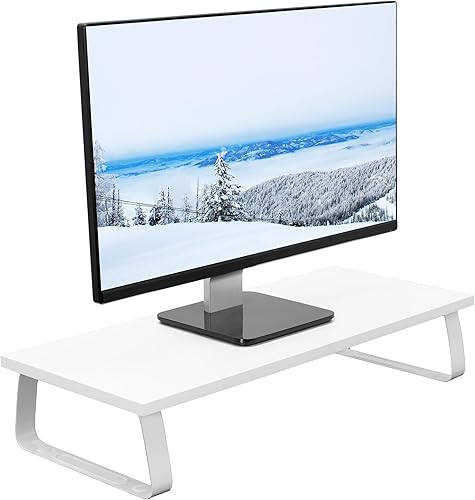
See the current price on Amazon.
View on AmazonShared workstations benefit from stands with adjustable legs. A 15-inch (38 cm) laptop screen sits much lower than a standard external monitor, so adding or removing 1-inch (2.5 cm) leg segments helps align the height of different screens. This modularity also accommodates different users in a shared space. Amazon Basics Adjustable Computer Monitor Riser Stand is a candidate for these types of setups. Verify the available height settings on the product page before purchasing.
Amazon Basics Adjustable Computer Monitor Riser Stand
Another monitor stand option to weigh against the points above.

See the current price on Amazon.
View on AmazonA riser with a built-in drawer helps organize desks cluttered with small supplies like charging cables and pens, keeping the work surface clear without a separate caddy. Pay attention to the vertical clearance under the drawer unit, though. A middle drawer may leave only 1.5 to 2 inches (3.8 to 5 cm) of space for a keyboard, which is often too low for mechanical keyboards with tall keys. Simple Houseware Metal Desk Monitor Stand Riser with Organizer Drawer is an example to evaluate for storage needs. Check the compartment dimensions on the product page for compatibility.
Simple Houseware Metal Desk Monitor Stand Riser with Organizer Drawer
A monitor stand worth comparing against the criteria in this guide.

See the current price on Amazon.
View on AmazonBefore placing a heavy monitor on a stand with a pull-out drawer, press down lightly on the center of the top shelf to confirm the frame does not flex and bind the drawer tracks.
Common Questions
Can I Put a Dual-Monitor Setup on a Single Monitor Stand?
This is possible only if the stand is wide enough to support both monitor feet. Two 24-inch (61 cm) monitors typically span 42 to 44 inches (107 to 112 cm), and their bases usually require a shelf between 32 and 38 inches (81 and 97 cm) wide. Using two separate risers is often more flexible because it allows you to angle the monitors in an arc to suit your line of sight.
How Much Clearance Do I Need Under the Stand for a Mechanical Keyboard?
Low-profile membrane keyboards are usually less than 1 inch (2.5 cm) tall, whereas mechanical keyboards with extended feet or tall keycaps can reach 2.2 inches (5.6 cm). Measure the distance from the desk to the lowest beam or drawer rail of the stand and aim for at least 2.5 inches (6.4 cm) of vertical space so the keys do not catch when you slide the keyboard underneath.
Is a Monitor Riser Better Than a Clamp-On Monitor Arm?
A riser is simpler if a desk has a glass top or a thick back apron, or if it sits flush against a wall. Risers also provide a shelf for items like speakers or docks. Clamp-on arms are a better choice for users who frequently rotate their screens or need to swing the monitor out of the way for other tasks.
Research-based. Based on manufacturer specifications and public information. Product details can change after the last-updated date. Prices are not shown here; check the retailer for the current price.