- Dynamic capsules kept 2 to 4 inches (5 to 10 cm) from your mouth reject room echo and keyboard clatter.
- USB connections plug straight into a computer, while XLR setups allow separate audio interface upgrades.
- Desk stands transfer typing vibrations; check for 3/8-inch (9.5 mm) or 5/8-inch (15.9 mm) boom arm threads.
- Cardioid polar patterns focus on sound in front of the grille and reduce noise from behind the desk.
Why a Studio Condenser Can Sound Worse in a Bedroom
Teammates on video calls complain about hollow audio. Or maybe a first podcast draft sounds like it came from inside a tiled bathroom. That usually sparks a microphone search. Many shoppers immediately look for a highly sensitive studio model because they assume extra sensitivity means clearer speech. In an untreated home office with bare drywall, hardwood floors, and a mechanical keyboard sitting 12 inches (30 cm) away, high sensitivity actually works against you. The capsule picks up everything. It cannot tell your voice apart from a ceiling fan, a passing delivery truck outside, or vocal reflections bouncing off a glass monitor screen.
Subtle differences in frequency response rarely separate a clean vocal recording from a muddy one in a regular room. What matters is the acoustic match between the microphone capsule, the speaking distance from your mouth, and the desk mounting hardware. Skip the extra switches and software bundles at first, and narrow your options by checking three practical elements: the capsule type and pickup pattern, the cable connection to your computer, and the mount that blocks desk vibrations.
To see how these criteria apply to a real model, look at Elgato Wave:3 USB Condenser Microphone and compare its specifications and included accessories against your desk space.
Elgato Wave:3 USB Condenser Microphone
A microphone worth comparing against the criteria in this guide.

See the current price on Amazon.
View on AmazonDynamic vs. Condenser Capsules: How Noisy Is Your Room?
Inside every microphone sits a capsule that converts air pressure from your voice into an electrical signal. Most desktop and studio vocal models rely on either a dynamic moving-coil design or an electrostatic condenser design, and knowing how each handles room noise lets you rule out half the market right away.
A dynamic microphone attaches its diaphragm to a wire coil suspended near a magnet. That coil has physical mass, so moving it takes strong sound pressure. You use a dynamic microphone up close, typically 2 to 4 inches (5 to 10 cm) from your mouth. Speaking that close builds a strong ratio of direct voice to background noise, while sound waves from a computer fan 3 feet (0.9 m) away or echoes off a back wall lose energy over distance and barely register. For shared living spaces, bedrooms without acoustic foam, and desks where you type while talking, a dynamic capsule is a forgiving choice.
A condenser microphone pairs a lightweight conductive diaphragm with a charged backplate. Because the moving part weighs much less than a copper coil, it reacts to fine acoustic details and fast transients. Speakers usually place a condenser 6 to 12 inches (15 to 30 cm) away, which keeps the mic out of a webcam shot. There is a catch. A condenser hears the room just as clearly as it hears your voice. Rugs, curtains, bookshelves, and quiet appliances let a condenser deliver an airy, detailed tone, whereas a bare room reveals every keystroke and hallway footstep.

Working distance changes how much room echo and keyboard noise reach the capsule.
Check the polar pattern alongside the capsule style. This three-dimensional shape maps where the microphone listens. A cardioid (heart-shaped) pattern is the standard starting point for a solo speaker at a desk. Sensitivity peaks directly in front of the grille, tapers off at the sides, and rejects sound from the rear right where your keyboard and monitor sit. Some multi-pattern condensers add omnidirectional and figure-8 settings, though those suit round-table meetings or two people facing each other across a quiet studio table rather than solo desk work.
Distance rule of thumb: Touch your thumb to your lips and extend your pinky finger to measure roughly 4 to 6 inches (10 to 15 cm). Dynamic mics sound fullest inside that span, while condensers work comfortably right at or just beyond it.
One option that fits this checklist is Shure SM7B Vocal Dynamic Microphone, whose exact pickup pattern, mounting yoke, and preamp requirements are listed on the product page.
Shure SM7B Vocal Dynamic Microphone
Another microphone option to weigh against the points above.

See the current price on Amazon.
View on AmazonShould You Choose a Direct USB Plug or an XLR Interface?
Once you match a capsule to your room, decide how the audio reaches your computer. Every microphone starts with an analog signal that needs a preamp for amplification and a converter to turn it into digital data, commonly measured at a bit depth of 16-bit or 24-bit and a sample rate of 44.1 kHz or 48 kHz. USB and XLR setups simply house those electronic components in different places.
Inside a USB microphone body sit the preamp, the analog-to-digital converter, and often a headphone jack. Run a single cable straight to your computer, pick the device in your system settings, and start talking without extra boxes or power cords cluttering the desk. Packing a single item into a backpack for travel, remote work, or solo streaming removes setup friction. Many USB models also place a zero-latency headphone jack on the underside of the body so you can hear your own voice in real time without computer delay.
An XLR microphone sends a raw analog signal out through a round three-pin connector. Connecting it to a computer requires a separate USB audio interface or digital mixer on your desk, which separates the microphone from the conversion electronics. Recording two people on separate tracks later, swapping in a different mic for acoustic instruments, or replacing a worn cable becomes much simpler when you can upgrade one part at a time.

USB places the converter inside the mic body; XLR moves preamps and conversion to a separate box.
Two technical requirements apply to XLR gear. Condenser models on an XLR cable almost always need 48-volt phantom power, which is a low-current DC voltage sent up the same audio cable from the interface to charge the capsule. Low-output dynamic models present a different demand: they often need 50 to 60 dB of clean preamp gain so your voice hits a healthy volume without background hiss. Confirm that your audio interface supplies 48V phantom power for a condenser or enough clean gain range for a low-sensitivity dynamic before committing to an XLR path.
You can run Shure MV7X XLR Podcast Microphone through the points above by checking the product page for required cables or interface hardware.
Shure MV7X XLR Podcast Microphone
One more microphone to check against the same criteria.

See the current price on Amazon.
View on AmazonHow Key Specifications Compare Across Common Setups
Side-by-side specification sheets often highlight raw numbers like a 20 Hz to 20,000 Hz frequency range, which tells you very little about daily usability in a home office. Working distance, room tolerance, and hardware requirements matter much more. The table below gives examples of typical ranges across standard desktop and studio categories.
| Feature | Dynamic XLR Setup | Condenser USB Setup | Condenser XLR Setup |
|---|---|---|---|
| Typical Working Distance | 2 to 4 inches (5 to 10 cm) | 6 to 12 inches (15 to 30 cm) | 6 to 12 inches (15 to 30 cm) |
| Untreated Room Rejection | High (ignores most room echo) | Low to Moderate (captures room tone) | Low to Moderate (captures room tone) |
| Required Extra Hardware | Audio interface (often 50 to 60 dB gain) and 3-pin XLR cable | None (connects via single USB cable) | Audio interface with 48V phantom power and 3-pin XLR cable |
| Standard Digital Resolution | Determined by interface (typically 24-bit / 48 kHz) | Built-in converter (typically 16-bit or 24-bit / 48 kHz) | Determined by interface (typically 24-bit / 48 kHz) |
| Ideal Mounting Style | Boom arm to reach mouth height | Shock mount or low-vibration arm | Shock mount on boom arm or floor stand |
Audio-Technica AT2020 Cardioid Condenser Studio XLR Microphone
A microphone worth comparing against the criteria in this guide.
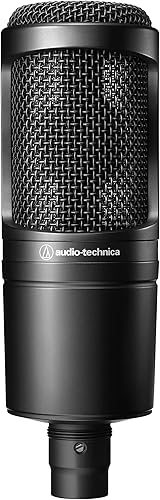
See the current price on Amazon.
View on AmazonPre-Purchase Checklist: Mounting, Threads, and Desk Clearance
Place a well-matched capsule on a short plastic stand right next to your keyboard, and it will still sound dull or boomy. Every keystroke sends low-frequency mechanical thumps through the desktop, up the stand, and straight into the capsule. Worse, a short stand sits 14 to 18 inches (36 to 46 cm) below your mouth and forces you to speak downward toward your chest. Run through this four-step checklist before finalizing your choice:
- Check the mounting thread size: Almost all microphone stands and boom arms in the United States use a 5/8-inch-27 (15.9 mm) thread, whereas many European arms and compact camera mounts use a 3/8-inch-16 (9.5 mm) thread. Make sure the microphone or arm includes a brass step-down adapter so the two pieces screw together tightly.
- Measure your desk clamp edge: Standard C-clamp boom arms require a flat overhanging desk lip between 0.5 and 2 inches (1.3 and 5.1 cm) thick. Check underneath for beveled edges or metal support frames that could block the clamp screw.
- Account for total weight on the arm: Pairing a heavy metal microphone with an external shock mount can put 1.5 to 2.5 pounds (0.68 to 1.13 kg) on the end of the arm. Verify that the boom arm springs or friction joints are rated to hold that load without sagging mid-call.
- Plan for plosive protection: Consonant sounds like "P" and "B" launch bursts of air that register as loud low-end pops. If you speak within 2 to 4 inches (5 to 10 cm), check for a built-in pop filter, a slip-on foam windscreen, or room to clamp a mesh shield in front of the grille.
Positioning tip: Point the capsule toward the corner of your mouth at a 30- to 45-degree angle instead of speaking straight into the center of the grille. Air bursts will pass harmlessly across the front while keeping your vocal tone clear, and the off-center placement can help reduce strain on your neck.
Matching the Microphone to Your Room and Workflow
Picking the right microphone comes down to an honest look at your room and your habits. A dynamic capsule mounted on a close boom arm blocks out background noise best when you record in a regular bedroom or shared office and type while talking. Quiet, carpeted rooms with soft furnishings open the door to a cardioid condenser, which also works well parked 8 to 10 inches (20 to 25 cm) away at the edge of a camera frame so it captures natural detail without crowding your face. Pair that capsule with a single-cable USB connection for quick setup or an XLR chain for modular upgrades, mount it on a 5/8-inch (15.9 mm) or 3/8-inch (9.5 mm) boom arm to stop desk thumps, and your voice will come through clearly on the first take.
Research-based. Based on manufacturer specifications and public information. Product details can change after the last-updated date. Prices are not shown here; check the retailer for the current price.