- A 1000R curve shifts a screen's center of gravity 4 to 6 inches (10 to 15 cm) forward from the mount.
- Reduce flat-panel weight limits by 25% to 35% when mounting a deeply curved 49-inch (124 cm) display.
- Heavy-duty tilt heads use dual compression springs or locking pins to stop forward screen droop.
- Freestanding bases need at least 12 inches (30 cm) of front-to-back depth to counter forward leverage.
Why a 30-Pound Ultrawide Acts Like a 45-Pound Load
A 49-inch (124 cm) super-ultrawide screen weighing 30 pounds (13.6 kg) without its factory base puts as much rotational force on a stand as a 45-pound (20.4 kg) flat display. Tight 1000R panels follow a circle with a 1,000-millimeter (39.4-inch) radius. Their outer wings reach 6 to 8 inches (15 to 20 cm) ahead of the rear mounting bracket. That curve pushes the panel's center of gravity 4 to 6 inches (10 to 15 cm) forward from the mounting plate. By comparison, a standard flat panel sits just 1.5 to 2 inches (3.8 to 5.1 cm) ahead of the plate.
Standard supports assume flat-screen physics, where weight hangs straight down the vertical pole or rests evenly across a shallow shelf. Hanging a curved 34-inch (86 cm), 38-inch (97 cm), or 49-inch (124 cm) panel on a standard bracket creates a lever arm. The vertical column or desktop platform might hold the dead weight without trouble. Meanwhile, that forward-shifted mass pulls the top of the screen toward the desk, straining both the tilt joint and the front edge of the base.
Core Criteria for Deep Curves and Forward-Shifted Weight
Tilt Head Torque and Pivot Mechanisms
When a VESA-mounted ultrawide fails, the vertical steel pole is rarely the problem. Trouble starts at the tilt joint right behind the VESA 100x100 mm (3.9x3.9 inch) plate. Standard friction hinges rely on a single horizontal bolt tightened with a hex key against plastic or thin metal washers. Put a 1000R or 1500R curve on that hinge, and the leverage slowly forces it to slip until the screen points at the keyboard.
Spec sheets that list a dedicated curved-screen capacity alongside the flat-screen rating make matching easier. When a stand lists only a general maximum load, derate that number by 25% to 35% for an 1800R to 1000R curved monitor. A bare panel weighing 28 pounds (12.7 kg) needs a VESA head rated for 40 to 44 pounds (18.1 to 20.0 kg) of flat weight. Another option is choosing a head built with a dual-spring counterbalance or a serrated locking pin that blocks downward rotation.
Check your display manual for the "panel-only" or "without stand" weight. Factory pedestals on 49-inch (124 cm) monitors often weigh 8 to 12 pounds (3.6 to 5.4 kg) on their own. That base weight does not count toward a VESA bracket's limit, though it does count when setting the whole monitor on a desktop riser.
Base Depth and Counterweight Distribution
Freestanding VESA posts and desktop riser shelves stay upright only when the combined center of gravity stays well behind the front edge of the base. An 8-inch (20 cm) circular or narrow rectangular base holds a 27-inch (69 cm) flat panel without issue. Putting a heavy curved ultrawide on that same footprint shifts the balance point near the front lip as soon as the screen tilts slightly downward.
Supporting a 34-inch (86 cm) or larger curved display on a freestanding VESA post calls for heavy-gauge steel or cast iron at the bottom. Aim for a base depth of 11 to 14 inches (28 to 36 cm) and a width of 14 to 20 inches (36 to 51 cm). V-shaped or broad rectangular footprints extend metal beneath the protruding wings of the monitor to counter forward tipping.
VIVO Single Monitor Desk Stand
A monitor stand worth comparing against the criteria in this guide.
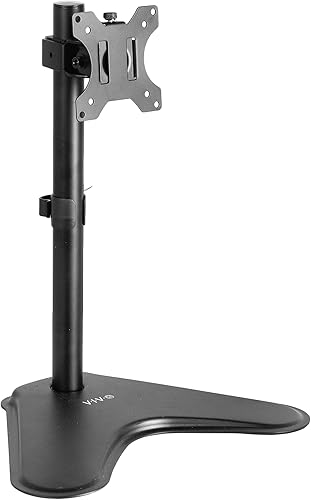
See the current price on Amazon.
View on AmazonPlatform Span and Center-Leg Support on Riser Shelves
Keeping the wide factory feet on a curved monitor and setting the whole unit on an elevated platform raises the screen by 4 to 6 inches (10 to 15 cm) while opening up storage underneath. Factory legs on a 49-inch (124 cm) monitor span 24 to 32 inches (61 to 81 cm) from tip to tip. From front to back, those feet project 10 to 13 inches (25 to 33 cm).
Platform risers need a top board measuring 36 to 48 inches (91 to 122 cm) wide and 10 to 12 inches (25 to 30 cm) deep so wide tripod feet sit flat without hanging over the edges. Mid-span sag is just as important to watch. An unbraced 39-inch (99 cm) span of 0.6-inch (15 mm) particleboard or MDF bows over time under a 35-pound (15.9 kg) combined load of panel and factory stand. Boards at least 0.75 inches (19 mm) thick, steel under-frame bracing, or extra vertical legs right below the monitor's feet keep the shelf level.
VIVO Black 39 Inch Extra Long Monitor Stand Wood Desk Riser (STAND-V000L)
One more monitor stand to check against the same criteria.

See the current price on Amazon.
View on AmazonWhat You Give Up With Each Monitor Stand Style
Mounting an oversized screen always trades away desk surface, adjustment range, or installation simplicity. Knowing where each design gives ground keeps you from pairing a stand with the wrong desk material or daily setup.
- Freestanding VESA posts vs. desk space: A weighted VESA base avoids clamping onto fragile glass, thin honeycomb cardboard, or beveled desk edges. The trade-off is a steel plate covering 150 to 250 square inches (968 to 1,613 sq cm) right behind the keyboard, and the screen cannot sit any further back than the rear edge of that plate.
- Platform desk risers vs. tilt and height flexibility: Leaving the factory stand on a wide wood or steel riser skips VESA tilt-head droop because the original hinge matches the panel's curve. Quick one-handed height and swivel adjustments disappear, though, and fixed riser legs can block an 18-inch (46 cm) full-size mechanical keyboard from sliding underneath.
- Clamp or grommet heavy-duty arms vs. desk structural load: Clamp-mounted arms clear the desk surface and move easily, which can help reduce neck and shoulder strain during long work sessions. In exchange, 45 pounds (20.4 kg) of combined monitor and arm weight presses down on a 4-by-4-inch (10-by-10 cm) C-clamp plate, which can crush hollow-core tops or warp 0.75-inch (19 mm) wood without a steel spreader plate.
To see how these trade-offs play out on an actual model, review the specifications for FITUEYES Large Dual Monitor Stand Riser Configurable Length (DT204201WB) before deciding.
FITUEYES Large Dual Monitor Stand Riser Configurable Length (DT204201WB)
Another monitor stand option to weigh against the points above.

See the current price on Amazon.
View on AmazonMeasure your monitor's existing base from the front toe to the rear heel before choosing a wide platform riser. Many curved-screen stands hide a deep rear spine that demands a 12-inch (30 cm) shelf depth even when the front feet look short.
Comparison of Typical Monitor Stand Configurations
The table below shows how common support styles handle heavy curved displays, using example ranges typical of standard hardware categories.
| Support Configuration | Typical Flat Capacity Range | Effective 1000R Curved Capacity | Typical Base or Clamp Footprint | Primary Stability Mechanism |
|---|---|---|---|---|
| Standard Freestanding VESA Post | 15 to 22 lbs (6.8 to 10.0 kg) | 10 to 14 lbs (4.5 to 6.4 kg) | 8 x 10 in (20 x 25 cm) | Single friction bolt and light steel base |
| Heavy-Duty Freestanding VESA Stand | 30 to 44 lbs (13.6 to 20.0 kg) | 22 to 30 lbs (10.0 to 13.6 kg) | 12 x 18 in (30 x 46 cm) | Dual-spring or locking tilt head with wide weighted base |
| Wide Multi-Leg Platform Riser | 44 to 88 lbs (20.0 to 39.9 kg) | 44 to 88 lbs (20.0 to 39.9 kg) with factory base | 36 to 48 in wide x 10 to 12 in deep (91 to 122 cm x 25 to 30 cm) | Center support legs and factory monitor pedestal |
| Heavy-Duty Clamp/Grommet Arm | 35 to 49 lbs (15.9 to 22.2 kg) | 26 to 35 lbs (11.8 to 15.9 kg) | 4 x 5 in (10 x 13 cm) clamp pad | Torsion spring head and under-desk C-clamp |
Order of Decisions and Common Questions
Running through these five checks in order prevents missed measurements when matching a stand to your screen:
- Check the screen's weight with and without its factory stand: Use the bare panel weight when bolting a VESA bracket to the back, or use the combined weight when setting the whole monitor on a platform riser.
- Find the curvature radius and apply the torque derating rule: Multiply the bare panel weight of a 1500R or 1000R screen by 1.35 to get the minimum flat-panel rating needed on a VESA tilt head.
- Confirm the VESA bolt pattern and recessed adapter hardware: Check whether the rear panel uses a 100x100 mm (3.9x3.9 inch) or 75x75 mm (3.0x3.0 inch) square, and look in the monitor box for the cylindrical metal spacers often needed on recessed curved backs.
- Measure desk depth: Make sure the desk is at least 28 to 30 inches (71 to 76 cm) deep so a 12-inch (30 cm) base and forward-curving screen wings still leave a viewing distance of 20 to 30 inches (51 to 76 cm).
- Match the base footprint to your desk gear: Decide between a central VESA base plate that leaves the sides open and a wide multi-leg riser shelf that bridges across a keyboard and audio interface.
Why does my curved monitor tilt down even though it is under the weight limit?
Ratings on spec sheets come from a thin, flat test weight bolted flush against the VESA bracket. Curved monitors bow outward at the sides, placing the center of mass several inches ahead of the pivot bolt. That forward offset turns the panel into a lever that overpowers standard friction washers, even when the display weighs 10 pounds (4.5 kg) less than the listed limit.
Can I put a heavy 49-inch monitor on a wooden desk riser instead of a VESA mount?
Yes, and keeping the factory stand lets you use the original tilt hinge built for that exact curve. Pick a riser with a center support leg or adjustable inner legs so the board does not sag, and check that the shelf is deep enough for the full front-to-back spread of the factory feet.
Do ultrawide monitors need a special VESA adapter plate?
Most ultrawide monitors use a standard VESA 100x100 mm (3.9x3.9 inch) hole pattern, but the mounting area often sits inside a deep circular recess on the rear plastic casing. A universal plate with both 75x75 mm (3.0x3.0 inch) and 100x100 mm (3.9x3.9 inch) holes can catch on that plastic rim. Using the proprietary adapter bracket from the monitor box or adding 10 to 15 mm (0.4 to 0.6 inch) metal standoffs with longer M4 bolts clears the recess.
How much desk depth do I need for a freestanding ultrawide stand?
Plan on a desk depth of 28 to 32 inches (71 to 81 cm). Freestanding bases and risers take up 10 to 14 inches (25 to 36 cm) front to back, while a 1000R curve pushes the center of the panel several inches ahead of the base's rear edge. Setting that combination on a shallow 24-inch (61 cm) desk brings the screen closer than 18 inches (46 cm) to your eyes, forcing constant head turning to read the outer edges.
Research-based. Based on manufacturer specifications and public information. Product details can change after the last-updated date. Prices are not shown here; check the retailer for the current price.