- Measure hand length from wrist crease to middle fingertip and width across the knuckles.
- Match mouse grip width to roughly 60 percent of your hand width for balanced finger control.
- Choose a centered hump for full palm support or a rear-biased hump to anchor a claw grip.
- Verify side wall curvature and button height before checking sensor or switch specifications.
Why 60 Percent of Your Hand Width Dictates Mouse Control
A widely used starting rule in shell sizing is the 60 percent ratio. The actual grip width at the narrowest waist, where your thumb and ring finger rest, generally feels most controllable around 60 percent of your hand width. For a hand measuring 3.7 inches (9.5 cm) across the knuckles, a 2.2-inch (56 mm) waist keeps the thumb and outer fingers neutral so they neither pinch inward nor splay wide. Focusing on sensor specs or switch ratings before shell geometry often leads to choosing a high-performing unit that causes hand fatigue after 30 minutes of desk work or gaming.
Accurate baseline numbers start with placing your dominant hand flat on a hard surface, keeping your fingers together and your thumb relaxed against your index finger. Hand length runs from the first distinct crease at the base of your wrist to the tip of your middle finger. Width is taken across the widest part of the palm from the outer pinky knuckle to the outer index knuckle. Some methods exclude the thumb, while traditional three-finger-plus-thumb charts include the folded thumb against the palm. Including the thumb yields typical adult widths between 3.1 inches (8 cm) and 4.3 inches (11 cm), alongside lengths between 6.3 inches (16 cm) and 8.3 inches (21 cm).

Measure length to the middle fingertip and width across the four main knuckles.
Measure the narrowest grip waist rather than the widest back flare. Spec sheets often list the maximum rear width, which can be 0.2 inches (5 mm) to 0.4 inches (10 mm) wider than where your fingers actually hold the shell.
Logitech G PRO X SUPERLIGHT 2 Wireless Gaming Mouse
A mouse worth comparing against the criteria in this guide.

See the current price on Amazon.
View on AmazonCore Shell Criteria: Length, Hump Placement, and Side Curvature
Shell length determines whether your fingers overhang the main triggers when your palm rests near the back of the mouse. A common guideline matches mouse length to roughly 63 to 67 percent of hand length for full-contact postures. If you curl your fingers or leave your palm off the shell entirely, that target drops to 55 to 60 percent. As an example, a 7.5-inch (19 cm) hand typically pairs with shells around 4.8 to 5.0 inches (122 to 127 mm) long for full support. A 6.7-inch (17 cm) hand often finds that anything over 4.6 inches (117 mm) pushes the fingertips too far back from the optimal click zone.
Hump height and longitudinal placement matter just as much as overall length, so two shells standing 1.5 inches (38 mm) tall and 4.8 inches (122 mm) long can feel completely different depending on where the peak sits:
- Centered hump: The highest point sits near the middle of the shell and slopes gradually toward both ends. This shape supports the metacarpal arch under your knuckles and encourages the whole hand to lie flat.
- Rear-biased hump: The peak shifts toward the back third of the shell and drops steeply into the base of the palm. Front click height stays low, often around 0.7 inches (18 mm) at the leading edge, creating a solid rear anchor for curled fingers without blocking vertical micro-adjustments.
- Flat or low-profile hump: A total height below 1.4 inches (36 mm) stays clear of the palm entirely. Your fingers can pull the shell backward toward the wrist without colliding with the rear housing.

Centered humps fill the mid-palm, while rear humps brace the base of the hand.
Side wall curvature and symmetry complete the physical fit. Symmetrical (ambidextrous) shells mirror their left and right walls, usually bowing inward at the center waist to give the thumb and ring finger an even pinch point. Ergonomic (asymmetrical) shells tilt the top spine sideways, creating a higher left shoulder for the index finger and a lower right shoulder for the ring finger. They also carve a deeper thumb groove on the left alongside a rounded flare on the right. To apply these criteria to a specific model, compare the contour measurements of Razer DeathAdder V3 Pro Wireless Gaming Mouse against your hand size.
Razer DeathAdder V3 Pro Wireless Gaming Mouse
One more mouse to check against the same criteria.

See the current price on Amazon.
View on AmazonWhat You Give Up with Each Shape and Grip Choice
Every shell contour prioritizes stability in one direction by restricting movement in another. A mouse that fills your entire palm often pairs a 5.0-inch (127 mm) length with a 1.7-inch-tall (43 mm) tilted hump. That surface area distributes contact pressure evenly across your skin and can help reduce strain during eight-hour office sessions or sweeping arm movements. The trade-off is fine fingertip agility, since the back of the shell touches the base of your palm and blocks downward pulls using only your finger joints, requiring every vertical correction to come from the elbow and forearm.
Shifting to a compact claw or fingertip shell trades away passive resting support in exchange for range of motion. Dropping to a shell length of 4.5 inches (114 mm) and a grip width of 2.1 inches (53 mm) leaves roughly 0.5 inches (13 mm) to 0.8 inches (20 mm) of open air between the rear hump and your palm crease. That gap lets your fingers handle rapid vertical and diagonal adjustments alone, which helps when tracking small targets or crossing wide dual-monitor setups at higher pointer speeds. The catch is that your thumb, ring finger, and pinky must hold active tension to stabilize the smaller contact area, which can tire small hand muscles if gripped too tightly.
If your ring and pinky fingers drag on the desk pad, look at the right-side wall angle rather than overall width. Walls that taper wider toward the top ledge help lift your outer fingers off the surface.
Asymmetrical shells with built-in thumb rests introduce a similar trade-off. A protruding thumb wing keeps the side of your thumb from rubbing against the desk surface to cut friction during wide horizontal swipes, making BenQ Zowie EC2-C Ergonomic Wired Gaming Mouse a practical candidate to evaluate by comparing its exact dimensions to your measurements.
BenQ Zowie EC2-C Ergonomic Wired Gaming Mouse
Another mouse option to weigh against the points above.

See the current price on Amazon.
View on AmazonFixed thumb rests and deep ergonomic grooves do lock your hand into one strict placement. Rotating your wrist slightly or shifting from a relaxed palm posture while browsing to an arched claw grip during detailed editing can cause those sculpted ledges to press into your knuckles.
Logitech MX Master 3S Wireless Performance Mouse
A mouse worth comparing against the criteria in this guide.

See the current price on Amazon.
View on AmazonHand Size and Grip Style Comparison Table
The measurements in the table below are examples of typical ranges used to pair adult hand sizes and grip postures with shell dimensions.
| Hand Size Category | Typical Hand Length | Typical Hand Width | Grip Style | Example Mouse Length | Example Grip Width | Preferred Hump Profile |
|---|---|---|---|---|---|---|
| Small | Under 6.7 in (17 cm) | Under 3.3 in (8.5 cm) | Palm / Relaxed Claw | 4.4–4.6 in (112–117 mm) | 2.0–2.1 in (51–54 mm) | Centered, medium height: 1.5 in (38 mm) |
| Medium | 6.7–7.5 in (17–19 cm) | 3.3–3.7 in (8.5–9.5 cm) | Palm | 4.7–4.9 in (119–125 mm) | 2.2–2.3 in (56–59 mm) | Centered or tilted ergonomic: 1.6 in (41 mm) |
| Medium | 6.7–7.5 in (17–19 cm) | 3.3–3.7 in (8.5–9.5 cm) | Claw | 4.6–4.8 in (117–122 mm) | 2.1–2.2 in (53–56 mm) | Rear-biased, low front: 1.5 in (38 mm) |
| Medium to Large | 7.1–7.9 in (18–20 cm) | 3.5–3.9 in (9.0–10.0 cm) | Fingertip | 4.1–4.5 in (104–114 mm) | 1.9–2.1 in (48–53 mm) | Low, flat profile: under 1.4 in (36 mm) |
| Large | Over 7.5 in (19 cm) | Over 3.7 in (9.5 cm) | Palm / Claw | 4.9–5.2 in (125–132 mm) | 2.3–2.5 in (59–64 mm) | High centered or tall ergonomic: 1.7 in (43 mm) |
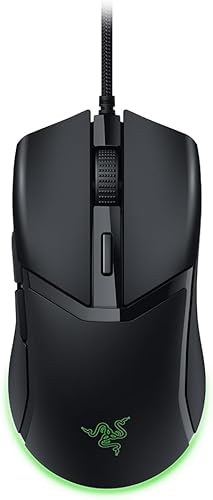
Readers matching their numbers against this table can also evaluate Razer Cobra Wired Gaming Mouse by inspecting its listed size and specification sheet.
Razer Cobra Wired Gaming Mouse
One more mouse to check against the same criteria.
See the current price on Amazon.
View on AmazonOrder of Decisions and Common Sizing Questions
Working through physical dimensions in a set sequence keeps secondary features from distracting you while building a shortlist:
- Record your exact hand length and width: Use a rigid ruler on a flat desk and write down both numbers in inches and millimeters for easy comparison against manufacturer spec sheets.
- Identify your primary contact points: Notice whether the center of your palm rests on your current mouse (palm), only the lower heel of your palm touches while your fingers arch (claw), or only your five fingertips make contact (fingertip).
- Filter by grip waist width first: Calculate 60 percent of your hand width (with the thumb folded against the palm) and eliminate shells that deviate by more than 0.15 inches (4 mm) from that target waist.
- Match hump location to your palm contact: Select a centered or tilted ergonomic peak for full palm support, a rear-shifted hump for claw stability, or a low, flat shell for pure fingertip clearance.
- Check total length and trigger height last: Confirm that the overall length leaves about 0.2 inches (5 mm) of margin past your middle finger in a palm grip, or enough rear clearance to tuck the shell back in a fingertip grip.
What if my hand length is large, but my hand width is narrow?
Prioritize grip width over shell length because a shell that is too wide for your knuckle span pushes your thumb and ring finger past a comfortable reach, hurting control much faster than 0.2 inches (5 mm) of missing length at the fingertips. Your fingers can curl slightly into a relaxed claw posture to fit a shorter shell, whereas bone structure cannot widen to span a broad waist.
How do I find the real grip width when spec sheets only list maximum width?
Manufacturers frequently publish the widest point of the base, which is usually the flared rear hips or a protruding thumb rest rather than the middle pinch zone. Symmetrical mice generally measure roughly 0.2 inches (5 mm) to 0.3 inches (8 mm) narrower at the waist than their listed maximum width. Wide office shells with a dedicated thumb wing may include a 0.5-inch (13 mm) flange in the spec, meaning a stated 3.3-inch (84 mm) width feels closer to a 2.4-inch (61 mm) grip waist in the hand.
Should I choose a symmetrical or an ergonomic tilted shell if I use a hybrid grip?
Postures that shift throughout the day, such as using a relaxed palm grip while reading documents and pulling into an arched claw grip during precision tasks, pair well with a symmetrical shell. Gently curved concave sides and a medium rear-center hump around 1.5 inches (38 mm) tall give your hand room to pivot, whereas deeply sculpted ergonomic shells work best when your hand stays in the exact tilted position of the mold.
Does button height at the front edge affect how a mouse fits?
Front trigger height directly changes the angle of your index and middle fingers. A tall front end measuring 0.8 inches (20 mm) or more off the desk keeps your fingers level with your knuckles to suit a flat palm posture. Lower front edges around 0.6 inches (15 mm) to 0.7 inches (18 mm) angle your fingertips closer to the tracking surface, giving a more direct feel for small cursor movements in claw and fingertip grips.
Research-based. Based on manufacturer specifications and public information. Product details can change after the last-updated date. Prices are not shown here; check the retailer for the current price.