- Wired USB, optical, or 3.5 mm inputs keep audio delay under the 40 ms human perception threshold.
- Two satellites spaced 24 to 36 inches (61 to 91 cm) apart create clearer directional cues than a soundbar.
- Check that the cabinet height stays under 4 to 6 inches (10 to 15 cm) to fit beneath a standard monitor bezel.
- Look for an upward driver tilt of 10 to 15 degrees if the speakers sit below ear level on a shallow desk.
Why Wired Inputs and Driver Geometry Matter for a Gaming Speaker
Hearing a footstep or reload animation a split second after the frame appears on screen breaks concentration in fast-paced games. A cramped desk also forces audio gear into awkward spots that muffle directional cues. Picking a gaming speaker comes down to three physical choices: a wired connection that keeps delay below the 30 to 40 milliseconds (ms) where the brain notices lip-sync drift, a layout that chooses between stereo satellites and a single soundbar, and a cabinet height that clears the bottom of your display. Standard Bluetooth connections routinely add 100 to 200 ms of delay. By contrast, a wired USB, optical TOSLINK, or 3.5 mm (0.14-inch) analog cable drops latency under 5 to 10 ms. Once delay is solved, physical placement takes over. Two satellites spaced 24 to 36 inches (61 to 91 cm) apart project a wider soundstage than a single bar tucked under a stand, provided your desk has the width to hold them.
One option that fits this checklist is Creative Pebble Pro 2.0 USB Desktop Speakers, and the product page lists the exact specifications to compare against your desk space.
Creative Pebble Pro 2.0 USB Desktop Speakers
A speaker worth comparing against the criteria in this guide.

See the current price on Amazon.
View on AmazonMeasure the vertical gap from your desk surface to the lower edge of your monitor bezel before shopping. Many adjustable stands leave only 3 to 5 inches (7.6 to 12.7 cm) of clearance at their lowest setting.
Comparing Gaming Speaker Connections, Imaging Layouts, and Desk Fit
Every desktop setup trades cable management against response time and footprint against stereo separation. The table below compares common connection and housing configurations using examples of typical ranges found across standard desktop audio gear.
| Feature Category | Configuration Option | Typical Latency or Dimension Range (Example) | Primary Gaming Impact |
|---|---|---|---|
| Connection Type | 3.5 mm (0.14-inch) Analog Aux | Under 1 ms | Zero perceptible lag; relies on the quality of your motherboard audio jack |
| Connection Type | USB-A / USB-C Digital Audio | 2 to 10 ms | Single-cable power and audio option; bypasses noisy internal PC sound cards |
| Connection Type | Optical TOSLINK (S/PDIF) | 2 to 5 ms | Eliminates electrical ground-loop hum from high-draw graphics cards |
| Connection Type | Standard Bluetooth (SBC/AAC) | 100 to 200 ms | Visible lip-sync delay and late gunfire cues in action titles |
| Cabinet Layout | 2.0 Stereo Satellites | 24 to 36 inches (61 to 91 cm) spacing | Distinct left, center, and right phantom imaging for tracking movement |
| Cabinet Layout | Compact PC Soundbar | 16 to 20 inches (41 to 51 cm) width | Saves lateral desk space; narrower soundstage than separated satellites |
Start your search by filtering for audio delay and signal noise. When a graphics card works under a heavy load, unshielded 3.5 mm (0.14-inch) analog cables routed near power cords can pick up a faint buzzing noise known as ground-loop interference. Digital USB or optical cables move the digital-to-analog converter outside the computer case. That separation keeps the noise floor quiet while holding latency well below the 30 to 40 ms human detection threshold. Standard USB audio processes 16-bit or 24-bit streams at sample rates between 44.1 kilohertz (kHz) and 96 kHz without adding buffer delay. For wireless background music from a phone, look for a speaker that pairs Bluetooth with a dedicated wired input for active gaming sessions.
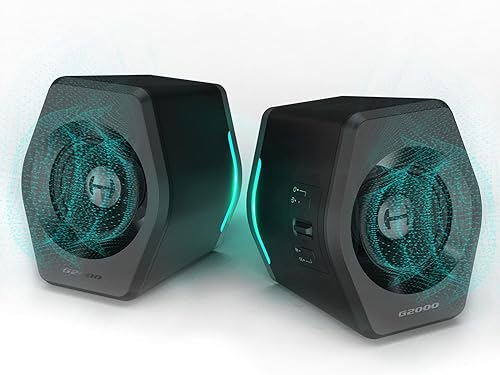
To see how these input options and cabinet dimensions come together on a spec sheet, take a look at Edifier G2000 32W PC Gaming Speakers.
Edifier G2000 32W PC Gaming Speakers
One more speaker to check against the same criteria.
See the current price on Amazon.
View on AmazonTelling whether an opponent is approaching from the ten o'clock or two o'clock position depends on physical driver separation rather than virtual surround software. High-frequency sound waves above 2 kHz carry the sharpest directional cues and travel in narrow beams. When two stereo cabinets flank a 27-inch (68.6 cm) monitor at a listening distance of 24 to 36 inches (61 to 91 cm), angling the baffles inward by 15 to 30 degrees points the drivers straight at your ears. This equilateral triangle geometry anchors dialogue to the center of the screen while off-screen effects pan smoothly from side to side.

An equilateral triangle layout with a 30-degree inward toe-in sharpens left-to-right soundstage cues.
Audioengine A2+ Wireless 60W Powered Desktop Speakers is a practical candidate to measure against these placement rules, with port layouts and dimensions listed on its product page.
Audioengine A2+ Wireless 60W Powered Desktop Speakers
Another speaker option to weigh against the points above.

See the current price on Amazon.
View on AmazonDesktop speakers usually sit below chest height, so high frequencies bounce off the desk surface and smear positional clarity before reaching your ears. Cabinets built with an upward baffle tilt of 10 to 15 degrees—or placed on angled isolation stands—aim the acoustic axis toward a seated ear height of 42 to 48 inches (107 to 122 cm) from the floor. Full-range drivers measuring 2 to 3 inches (5.1 to 7.6 cm) across keep the cabinet under 4 to 6 inches (10 to 15 cm) tall so it slides beneath a widescreen monitor. That compact size comes with an acoustic trade-off. Small enclosures without a separate subwoofer roll off low frequencies below 80 to 100 hertz (Hz), trading deep rumble for clear midrange footsteps and vocal callouts.

An upward driver tilt of 10 to 15 degrees aims high frequencies toward your ears from beneath a screen.
Keep at least 2 to 4 inches (5.1 to 10.2 cm) of open space behind rear-ported speakers or passive radiators so wall reflections do not muddy quiet positional cues.
Which Setup Matches Your Desk and Play Style
Competitive multiplayer gamers who rely on directional cues but dislike wearing a headset for hours are best served by a wired 2.0 stereo pair with angled baffles. Spacing two enclosures 28 to 32 inches (71 to 81 cm) apart around your primary monitor gives your ears genuine time-of-arrival differences between the left and right channels. A USB or optical input avoids analog hiss from the motherboard, and turning off synthetic surround-widening modes prevents a smeared center image. You can compare Creative Pebble V3 Minimalistic 2.0 USB-C Desktop Speakers against these requirements by checking the input types and enclosure measurements on its product page.
Creative Pebble V3 Minimalistic 2.0 USB-C Desktop Speakers
A speaker worth comparing against the criteria in this guide.

See the current price on Amazon.
View on AmazonAn ultrawide 34-inch (86.4 cm) curved display or a dual-monitor arm on a shallow desk under 24 inches (61 cm) deep often blocks the outer edges of the tabletop. Tucking stereo satellites behind the wings of a wide screen muffles high frequencies and ruins imaging. Instead, a low-profile gaming soundbar under 3 inches (7.6 cm) tall and 16 to 20 inches (41 to 51 cm) wide fits between the monitor stand legs right below the bezel. The left-to-right soundstage remains narrower than with separated satellites, but the open front baffle preserves crisp dialogue and fast response over a single USB cable. Razer Leviathan V2 X PC Gaming Soundbar is another model to check against your under-monitor clearance and width measurements.
Razer Leviathan V2 X PC Gaming Soundbar
One more speaker to check against the same criteria.

See the current price on Amazon.
View on AmazonSwitching between a desktop PC and a console wired to the same monitor makes input selection as important as cabinet shape. Many consoles do not support generic USB audio gear and lack optical ports, so they route sound through the monitor's 3.5 mm (0.14-inch) pass-through jack. A speaker system with both a digital USB port for the PC and an independent 3.5 mm (0.14-inch) auxiliary input for the monitor keeps both machines connected without swapping cables behind the desk.
When plugging speakers into a monitor's 3.5 mm (0.14-inch) headphone jack, set the monitor's internal volume menu to 70 or 80 percent first to prevent signal clipping before turning the speaker knob.
Common Questions
Can I Use Bluetooth on a Desktop Speaker for Gaming If It Supports Low-Latency Codecs?
Standard Bluetooth codecs like SBC and AAC add 100 to 200 ms of delay, leaving gunfire and dialogue noticeably out of sync with on-screen motion. Specialized codecs such as aptX Low Latency or aptX Adaptive trim wireless delay to roughly 30 to 40 ms, right on the edge of human perception. Both the speaker and a compatible hardware transmitter dongle plugged into your PC must support that exact codec for it to work. Because native Windows Bluetooth stacks rarely support low-latency gaming codecs out of the box, a wired USB, optical, or 3.5 mm (0.14-inch) cable remains the reliable way to keep response times under 10 ms.
Do I Need a Separate Subwoofer to Hear Footsteps and Directional Cues Clearly?
A subwoofer is unnecessary for positional accuracy and can even mask subtle cues if tuned too loudly. Footsteps, weapon reloads, and rustling foliage sit in the midrange and upper-midrange bands between 500 Hz and 4 kHz, while a subwoofer handles low-end rumble below 80 to 100 Hz. Because deep bass frequencies are omnidirectional to human ears, they add weight to explosions in single-player games without helping you pinpoint where an opponent is standing.
Research-based. Based on manufacturer specifications and public information. Product details can change after the last-updated date. Prices are not shown here; check the retailer for the current price.