- Full-white spreadsheets can make an OLED panel draw up to twice the power of an IPS screen.
- Matte IPS coatings scatter overhead office glare, while glossy OLED glass preserves deep blacks.
- Subpixel layouts affect text edges at 1080p, making IPS sharper for small fonts at arm's length.
- Fixed taskbars and split-screen borders create uneven pixel wear on OLED panels over thousands of hours.
Why 12 Watts of Power Draw Changes How You Use a Portable Monitor
A typical 60-watt-hour laptop battery loses nearly a quarter of its runtime when a connected portable monitor pulls 12 watts instead of 6 watts over a 3-hour coffee shop session. Many buyers compare OLED and IPS screens by looking at color gamut percentages or response times on a spec sheet. Those numbers rarely explain why a laptop battery dies before lunch, or why small spreadsheet fonts look slightly fuzzy at an arm's length of 20 inches (51 cm). When a secondary screen draws power from a single USB-C cable under harsh overhead LED fixtures, panel physics matter much more than marketing claims.
An IPS (In-Plane Switching) panel uses a constant LED backlight behind a liquid crystal layer. Its power consumption stays steady whether the screen shows a black terminal window or a bright white document. An OLED (Organic Light-Emitting Diode) panel lights each pixel individually without a backlight, producing a nearly infinite contrast ratio in dark rooms compared to the 1,000:1 to 1,200:1 typical of standard IPS panels. Turning every pixel on to display a white background forces an OLED panel to draw much more power, which triggers automatic brightness limiters that dim the screen right as you maximize a document window.
Core Criteria for Comparing OLED and IPS Portable Monitor Panels
Picking a secondary travel display comes down to three daily friction points: how clean small letters look during eight hours of reading, how fast the panel drains your host laptop, and how the surface coating handles bright ceiling lights.
Subpixel Layouts and Static Text Clarity
A 15.6-inch (39.6 cm) screen running at 1920 x 1080 resolution has a pixel density of about 141 pixels per inch (55.5 pixels per cm). At a normal viewing distance of 18 inches (46 cm) to 24 inches (61 cm), individual pixel edges sit right near the limit of human vision. IPS panels almost always use a standard RGB vertical stripe subpixel layout. Operating system font-rendering engines like ClearType expect this exact grid when smoothing vertical and horizontal letter stems. Many OLED panels use non-standard diamond or triangular subpixel arrangements where green, red, and blue subpixels do not line up in uniform vertical columns. On a 1080p OLED screen, this layout can cause faint green or magenta color fringing along high-contrast edges, such as black 10-point text on a white background or thin grid lines in financial models. Stepping up to 3840 x 2160 (4K) resolution pushes pixel density past 280 pixels per inch (110 pixels per cm) and hides subpixel fringing from the naked eye, though it increases power draw.

Standard RGB stripes align cleanly with vertical font stems at 1080p.
Laptop Battery Drain and Average Picture Level
Every watt counts when you run a display off a laptop USB-C port without a wall adapter. Standard USB-C ports without enhanced power delivery often cap output at 4.5 watts (5 volts at 0.9 amps) or 7.5 watts (5 volts at 1.5 amps). Newer USB Type-C ports supporting 15-watt (5 volts at 3 amps) output give power-hungry panels more breathing room. Because an IPS backlight illuminates the whole panel at once, a 14-inch (35.6 cm) or 15.6-inch (39.6 cm) IPS screen at 250 nits of brightness usually pulls a steady 5 watts to 8 watts regardless of screen content. OLED power draw shifts with Average Picture Level (APL), which measures the percentage of white versus black across the frame. At a 20 percent APL, such as a code editor in dark mode, an OLED panel might pull only 4 watts to 6 watts. Switch that same screen to an 85 percent APL with two side-by-side word processing documents or web browsers, and power draw can jump to 11 watts to 15 watts. When that spike exceeds what the laptop's single USB-C port can supply, the screen may flicker, cap its maximum brightness at 150 nits, or shut off without warning.
Lowering an OLED workspace from a white theme to dark mode can cut panel power draw by 40 percent to 50 percent during battery-only work sessions. On an IPS screen, dark mode changes pixel orientation but leaves the backlight running at the exact same wattage.

OLED power draw scales with screen whiteness, while IPS stays steady.
Reflection Handling and Perceived Contrast Under Office Lighting
Spec-sheet contrast ratios are measured in pitch-black laboratories, whereas surface coatings dictate what you actually see in a bright room with 300 lux to 500 lux of ambient light from overhead fluorescent tubes or windows. Most IPS travel screens use a matte anti-glare coating that scatters incoming light across a micro-textured surface. You will not see a sharp mirror reflection of your face or ceiling bulbs, though the diffused light spreads across dark areas as a mild gray haze. Most OLED screens use a smooth, glossy glass or plastic surface to keep edges crisp and prevent graininess over solid colors. An OLED panel reaches 0.0005 nits on black pixels in a dark room, but a glossy glass surface reflects about 4 percent to 5 percent of ambient room light straight back to your eyes. That reflection turns dark gray user interfaces into mirrors whenever a window sits behind your chair.
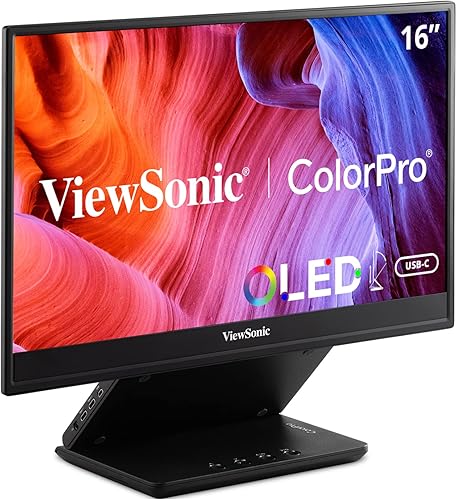
One option that fits this checklist is ViewSonic VP16-OLED 15.6 Inch 1080p OLED Portable Monitor, and you can check its specifications and connection requirements on the product page before comparing it to your laptop.
ViewSonic VP16-OLED 15.6 Inch 1080p OLED Portable Monitor
A portable monitor worth comparing against the criteria in this guide.
See the current price on Amazon.
View on AmazonWhat You Give Up With Each Panel Choice
Choosing between these two panel technologies means accepting a specific set of daily trade-offs rather than finding a flaw-free screen.
- What you give up with OLED: You trade away carefree static desktop habits and steady power draw. Leaving a fixed taskbar, static browser tabs, or a 50/50 split-screen window border in the same spot for 4 hours to 6 hours a day at 250 nits to 300 nits speeds up uneven organic subpixel aging, known as burn-in or permanent image retention. Built-in tools like pixel shifting move the image by a few pixels at regular intervals. Automatic Brightness Limiters (ABL) also dim the screen whenever a white window expands to fill more than 70 percent of the display, while bright offices bring mirror-like reflections and 1080p panels can show minor text fringing.
- What you give up with IPS: You trade away deep shadow detail, per-pixel contrast, and punchy dark-room media playback. In a dimly lit hotel room or on an evening flight, an IPS panel shows visible backlight glow (often called IPS glow) around the four corners when displaying dark movie scenes or black slide decks. Color saturation and peak contrast look flatter next to an emissive display. Pixel response times sit around 5 milliseconds to 14 milliseconds rather than the sub-1-millisecond transitions typical of OLED, which leaves fast scrolling slightly less sharp.
Positioning the top edge of your secondary screen near eye level at a viewing distance of 20 inches (51 cm) to 28 inches (71 cm) can help reduce neck and eye strain during long shifts. Tilting a glossy screen back by 10 degrees to 15 degrees often aims reflections toward the ceiling rather than your eyes.
To see how these criteria apply to a real product, look at Dell 14 Portable Monitor and check the panel and port specifications on the product page against your workflow.
Dell 14 Portable Monitor
One more portable monitor to check against the same criteria.

See the current price on Amazon.
View on AmazonPanel Behavior Comparison Across Real Work Scenarios
The table below compares how both panel types behave across common mobile work tasks, and the numbers shown are examples of typical ranges found in 14-inch (35.6 cm) to 15.6-inch (39.6 cm) models.
| Work Scenario or Metric | Typical OLED Panel Range | Typical IPS Panel Range |
|---|---|---|
| Power Draw on White Spreadsheets (85% APL, 200 nits) | 10 watts to 15 watts | 5 watts to 8 watts |
| Power Draw on Dark-Mode Coding (20% APL, 200 nits) | 4 watts to 6 watts | 5 watts to 8 watts |
| Static Contrast Ratio (Dark Room) | 100,000:1 or higher | 1,000:1 to 1,200:1 |
| 1080p Text Edge Clarity at 20 inches (51 cm) | Moderate (subpixel fringing possible) | High (standard RGB stripe alignment) |
| Surface Reflection in 400-Lux Office | Sharp mirror reflections (glossy surface) | Diffused haze, no sharp mirror image (matte) |
| Risk from Static UI Elements (4+ hours daily) | Cumulative uneven subpixel wear over time | No permanent burn-in risk |
Innocn 15A1F 15.6 Inch OLED Portable Monitor is a practical candidate to measure against the points above, and you can verify its included cables and technical details on the product page.
Innocn 15A1F 15.6 Inch OLED Portable Monitor
Another portable monitor option to weigh against the points above.

See the current price on Amazon.
View on AmazonOrder of Decisions and Common Questions
Work through these steps in sequence before choosing a panel type for your travel bag so you can avoid power and legibility surprises:
- Audit your primary applications: Estimate whether your screen shows bright white backgrounds (spreadsheets, documents, web forms) or dark interfaces (code terminals, video timelines, dark-mode apps) for more than 70 percent of your workday.
- Check your wall-outlet access: Decide if you usually work plugged into AC power or rely on your laptop's internal battery for 2 hours to 4 hours at a stretch.
- Check resolution against reading distance: Prioritize standard RGB subpixel layouts on IPS if you read 9-point to 11-point text at 20 inches (51 cm) on a 1080p screen, or step up to 4K resolution where either panel type renders sharp text.
- Evaluate your lighting environment: Choose a matte IPS finish for unassigned desks under bright ceiling lights, or pick a glossy OLED panel if you control your room lighting and want high contrast for color work or evening media.
- Verify USB-C port wattage on your laptop: Confirm whether your laptop's USB-C port supplies 7.5 watts or 15 watts so a high-APL OLED panel does not brown out when you open a bright window.
Auto-hiding your operating system taskbar and switching from a white desktop wallpaper to a solid black background takes less than 60 seconds and eliminates the two most common sources of uneven pixel wear on OLED travel screens.
Does Dark Mode Really Save Laptop Battery Life When Using an External Screen?
Dark mode saves battery power only when the external screen uses an OLED panel, which turns off individual pixels to display true black and drops power draw from roughly 12 watts on a white background down to 5 watts on a dark theme. On an IPS panel, liquid crystals block the light to create black while the LED backlight behind them keeps running at full power, yielding zero battery savings.
How Long Does It Take for Static Taskbars to Cause Visible Wear on an OLED Panel?
Visible image retention builds up from brightness levels and cumulative hours rather than a single session. Running static white or brightly colored UI icons at maximum brightness (often 300 nits to 400 nits) for 6 hours to 8 hours every day can start showing faint uneven wear after 1,500 hours to 3,000 hours of total use, while keeping brightness closer to 150 nits and hiding static toolbars extends uniform panel life.
Why Does an OLED Screen Suddenly Dim When I Maximize a Web Browser or Document?
The panel's Automatic Brightness Limiter (ABL) causes that sudden drop in luminance. To keep the organic diodes from overheating and hold electrical current within the 7.5-watt or 15-watt ceiling of a single USB-C cable, the monitor controller lowers peak brightness whenever bright white pixels cover more than 60 percent to 70 percent of the screen area, whereas IPS panels need no ABL and hold steady brightness at any window size.
Can a Matte Screen Protector Fix Glare on a Glossy OLED Panel Without Ruining Contrast?
A third-party matte film over a glossy OLED display cuts mirror reflections under 400-lux office lights, though it also scatters the light coming from the pixels themselves. That diffusion adds a fine, sparkling grain over solid white areas and raises the perceived black level in bright rooms, flattening much of the visual depth that makes OLED appealing.
Research-based. Based on manufacturer specifications and public information. Product details can change after the last-updated date. Prices are not shown here; check the retailer for the current price.